
Strategies for Engaging Elderly Patients With Technology

A technology problem isn’t always just a technology problem. Difficulty remembering passwords, confusing texts with emails, or struggling after an update can signal that an older adult needs more support, particularly when cognitive changes are involved. Effective strategies for engaging elderly patients with technology begin by identifying where someone is having trouble and making the tools they use feel manageable and relevant.
It’s understandable to worry that unfamiliar devices could cause frustration or make someone feel less independent. Patient, practical guidance can help older adults use technology to stay connected with family, participate in digital health, and manage everyday tasks at a pace that suits them.
This article explains how to start with familiar interests, teach one step at a time, adapt devices for vision or memory needs, and build in regular practice. It also covers privacy, online safety, and ways technology can support connection without taking away opportunities to act independently.
Key Takeaways
• Start by understanding which devices an older adult already uses, what they want to do, and whether they have reliable internet access.
• Make family connection practical by supporting simple activities such as calls or messages, then revisit the steps as questions arise.
• For cognitive or sensory challenges, reduce memory demands with written instructions and accessible device settings.
• Build confidence through small, repeated practice sessions focused on tasks that matter to the individual.
• Use digital health tools to support care engagement while preserving the older adult’s involvement in everyday decisions and activities.
1. Using technology to connect with family and caregivers
Caregivers can support technology use by practicing a specific task with the older adult, such as sending a text, while letting them control the device. Protect privacy by explaining what information should remain private, and support independence by asking before taking over.
Start with the person, not the device. A clinician or caregiver can ask which phone, tablet, or computer the older adult already uses, what they use it for, and whom they want to contact. Involvement should reflect the older adult’s preferences and care goals. A family member’s willingness to help does not automatically mean the patient wants them involved. If the patient chooses to include a caregiver, agree on practical roles, such as helping schedule a video call or reminding them how to open a message.
Build technology goals into the care plan as small, useful activities. One person might practice texting a daughter; another might learn to video call a friend. A shared online book discussion can give relatives a regular reason to connect. Clinicians can ask whether the patient wants to learn these tasks and note which steps need practice, so caregivers can reinforce the same routine between visits.
Caregivers can simplify access without removing choice. A landline programmed to call family or friends with one button press may suit someone who finds a smartphone difficult. For online bill payment, a caregiver can sit with the older adult and complete the task together. If the steps feel too confusing, the caregiver may handle the transaction while asking the person to identify which bills need attention. This keeps the older adult involved in decisions rather than silently taking over.
Keep support specific and consistent. Demonstrate one action, such as opening a message, then invite the older adult to repeat it. Pause for questions, and check in regularly because a familiar screen or process may change. For family communication, agree on a preferred method and a simple routine, such as texting before a scheduled call. If digital follow-up supports care after a hospital stay, heart failure discharge education through conversational agent technology is one example of technology delivering care information after discharge.
Set clear privacy boundaries before going online. Remind older adults not to share credit card or Social Security numbers through email, text, or chat, and practice pausing before responding to an unexpected request. Caregivers should explain their role, ask permission before viewing messages, and avoid requesting passwords unless access is genuinely needed to help. These steps support connection while keeping the older adult involved in decisions about their technology.
2. What are some techniques to help older people struggling with technology?
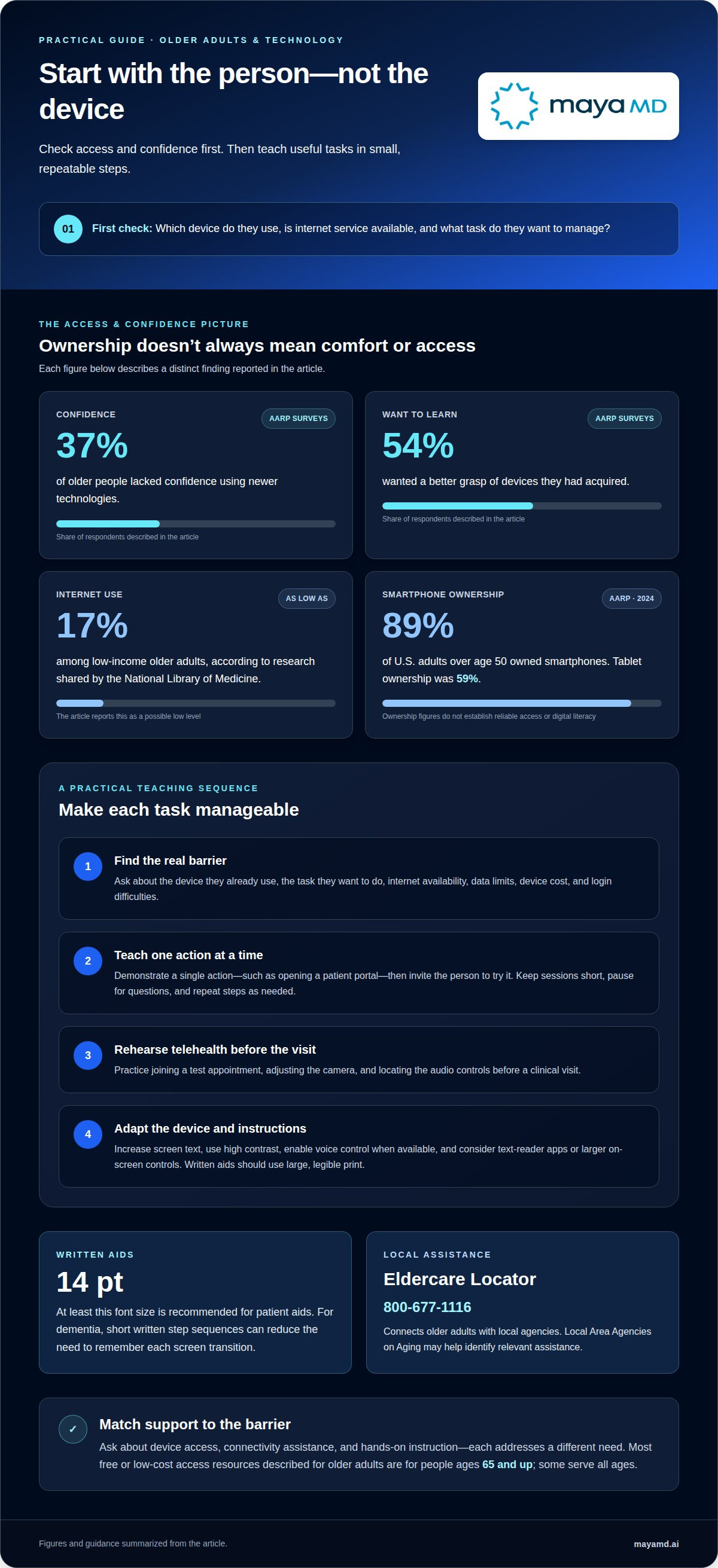
Begin with an access and confidence check, not a device tutorial. Ask which devices the older adult owns, whether internet service is available, and which task they want to manage. AARP surveys found that 37% of older people lacked confidence using newer technologies, while 54% wanted a better grasp of devices they had acquired. These findings support tailored instruction rather than assuming ownership means comfort.
Access is a practical barrier. Internet use among low-income older adults may be as low as 17%, according to research shared by the National Library of Medicine. Ask whether connection, data limits, device cost, or login difficulties prevent participation. AARP’s 2024 technology report found that 89% of U.S. adults over age 50 owned smartphones and 59% owned tablets, but ownership alone doesn’t establish reliable access or digital literacy.
Communication works best when it is specific, respectful, and paced around the patient’s goal. Demonstrate one action, such as opening a patient portal, then invite the person to try it. For telehealth, practice joining a test appointment, adjusting the camera, and finding the audio controls before a clinical visit. Teach in short sessions, pause for questions, and repeat steps as needed instead of introducing every feature at once.
Make each device easier to see, hear, and operate. Increase screen text, use high contrast, and enable voice control when available. Text-reader apps may help with vision-related barriers, while larger on-screen controls can simplify tapping for people with dexterity limitations. Written aids should use large, legible print; patient aids should use a font size of at least 14 points. For a person with dementia, a short sequence of written steps can reduce the need to remember each screen transition.
Affordable access and support depend on location and eligibility. Most free or low-cost technology access resources described for older adults are available to people ages 65 and up, while some serve all ages. Local Area Agencies on Aging may help identify relevant assistance; the Eldercare Locator can connect older adults with local agencies at 800-677-1116. Ask about device access, connectivity assistance, and hands-on instruction, since these address different barriers.
For ongoing telehealth or portal engagement, care teams can align instruction with the patient’s access needs and preferred communication method. Discuss digital patient engagement needs when a clinical workflow needs to support clearer, more accessible communication.
3. Digital health technology engagement among older adults with cognitive impairment
For an older adult with cognitive impairment, choose technology that fits a meaningful activity and their current abilities. A patient interested in follow-up appointments may want to practice joining a telehealth visit, while someone who enjoys music may prefer a simple audio app. Start with a task the person values, then observe which steps need reminders or support. Familiar interests give people a practical reason to build confidence with digital tools.
Telehealth preferences vary, so offer a choice rather than treating video visits as the default. In a June 2020 University of Michigan survey of U.S. adults ages 50-80, over 50% said office visits provided higher overall quality of care. A University of Michigan poll also found that 72% of respondents were interested in telehealth for follow-up questions with a doctor they had already seen. These findings suggest that a familiar clinician and a follow-up purpose may make remote appointments more acceptable.
Assess technology use as part of care, not as a test of competence. At every visit, clinicians at the Ohio State Wexner Medical Center’s Center for Cognitive and Memory Disorders explore patients’ ability to use computers, tablets, cellphones, TV remotes, and appliances. A care team can adapt this approach by asking the patient to demonstrate a relevant task, such as opening an appointment link. Note what the person does independently and where a prompt helps.
For each digital tool, caregivers can write down the steps so the patient doesn’t have to remember them alone. Keep instructions in the order the screen presents them, using familiar wording such as “open the appointment message” instead of technical jargon. During practice, let the person complete each action, pausing when needed. If the patient loses track, offer the next prompt rather than taking control of the device.
Privacy, security, and consent need direct attention. Explain what information a health tool collects, who may see it, and how a caregiver will participate. Ask the older adult’s permission before sharing access or involving family. People with Alzheimer’s disease or Lewy body, frontotemporal, or vascular dementia can face increased scam risk, particularly early in illness. Teach a simple pause-and-ask routine for unexpected messages, and never encourage sharing Social Security or credit card numbers through email, text, or chat.
Digital health tools can also support social participation, physical activity, and cognitive engagement when they match a person’s interests and abilities. Care teams can make engagement more accessible by incorporating a technology goal the patient wants to learn into therapy sessions, then reviewing whether the steps remain manageable. Discuss patient engagement workflows when planning accessible digital follow-up for older adults.
4. Engagement and digital intervention effectiveness
Engagement is part of an intervention, not a measure of whether someone likes technology. Among older adults, engagement with digital health technologies has a dose-response relationship with intervention effectiveness. In practice, care teams should make participation usable and relevant, then observe whether patients continue using the tool. A patient who opens a portal once but can’t complete the next step may need a clearer task or a more usable design, not simply another reminder.
Digital forms and patient portals work best when each screen has a clear purpose. A clinic, for example, can explain whether a form collects medication details, symptoms, or appointment preferences before the patient begins. Keep questions focused, use plain labels, and make the next action clear. If a patient struggles with an online form, offer another way to share the information, such as discussing it during an appointment. A portal should support the care relationship, not become a barrier to communication.
Build practice around activities the patient already finds enjoyable. A crossword puzzle, Scrabble game, or Sudoku can make learning to tap, scroll, or select an answer feel purposeful. Introduce one interaction at a time, then let the older adult repeat it independently. At the height of the COVID-19 pandemic in 2020, a little more than a quarter of one author’s patients had a technology or communication goal. That example illustrates how goals can be practical and personal, rather than limited to clinical tasks.
A digital photo frame can give family pictures a visible place in an older adult’s daily routine. Family members might choose a picture that prompts a conversation, then use it to start a phone or video call. Agree on who selects or shares images, and consider the patient’s preferences before displaying personal photographs. If the frame connects to the internet, include basic connection support in the setup plan. A picture can prompt a meaningful exchange, but the relationship-building comes from the people talking about it.
To assess whether a digital intervention remains useful, define a specific activity before introducing it. A care team might note whether the patient can find a portal message, complete a short form, or join a planned call. Review the task with the patient and adjust any confusing steps. If engagement declines, consider whether the instructions, device access, or task has changed. Regular review keeps technology aligned with the patient’s needs and helps teams distinguish usability problems from a lack of interest.
5. Supporting independence and reducing isolation
Technology can support independence when it helps an older adult complete a chosen daily task. A phone reminder may prompt someone to take medicine, while a calendar alert can help them prepare for an appointment. Start by identifying one routine the person wants to manage, then set up the reminder together. Let the older adult choose the alert wording and timing, so the tool supports their routine rather than directing it.
When a digital task becomes difficult, sit beside the person and work through it together. For example, an older adult can select a grocery delivery item while a caregiver helps navigate the screen. This shared approach preserves decision-making and offers practical support without automatically taking over. If the person can complete part of a task, let them do that portion and help with the rest.
Ongoing support matters as phones, apps, and routines change. Arrange regular check-ins around a specific task, such as reviewing a calendar reminder or practicing how to join a call. Ask what worked and what caused difficulty. A small adjustment, like moving an app icon, may make the next attempt easier. Repeat the same steps when needed, and introduce new functions only when the older adult is ready.
For social connection, help the person choose a recurring activity, not just a device. FaceTime or Zoom can make a weekly conversation with relatives easier to maintain. Area Agencies on Aging and the YMCA may offer virtual exercise classes, providing a scheduled opportunity for movement and contact. An older adult who wants to contribute can also explore volunteering from home or virtual mentoring with a student through a local college. Match the activity to the person’s interests and energy.
Password support should balance usability and security. Help the older adult create secure passwords and consider using a password manager. If others are unlikely to access the person’s passwords, a caregiver can write them down and store the list somewhere the person will remember. Agree on who can access that location, and revisit the arrangement if living circumstances change. For people who may struggle to recall passwords, a consistent, secure process can reduce interruptions to everyday phone use.
These steps work best when the older adult’s preferences guide the support plan. Identify the task, decide what assistance is welcome, and review whether the tool still helps. Contact MayaMD to discuss digital patient engagement that supports continuity between care interactions.
MayaMD
MayaMD supports healthcare teams seeking more consistent digital engagement with older patients and caregivers. Its AI patient engagement solutions and automated post-discharge communication can help care teams extend communication beyond appointments and reinforce follow-up information after a hospital stay. The Clinical AI Agent offers another way to connect patients with healthcare communication through a digital channel. These capabilities can complement the practical approaches in this article, including accessible instructions, family involvement chosen by the patient, and support for ongoing care. Consider MayaMD when your organization is planning how digital patient communication can fit into its care workflows. Contact MayaMD to discuss your patient engagement needs.
Make patient connection an ongoing care priority
The next step is to make strategies for engaging elderly patients with technology part of an ongoing improvement process. Start with one goal that matters to patients, then use their feedback to shape how digital communication fits into care. A tool’s value depends not only on its functions, but also on whether patients can use it in ways that feel relevant and manageable. This perspective helps healthcare teams make thoughtful decisions as patient needs and care workflows evolve.
Progress can begin with a focused conversation among care leaders, clinicians, and those responsible for patient engagement. Identify where communication feels difficult, consider how digital support could fit, and define what a more connected patient experience should look like. Keep the purpose clear: technology should support human relationships and care, not replace them.
If your organization is considering how to strengthen patient communication through technology, contact MayaMD to discuss your needs. Each thoughtful step can help create a more accessible and connected care experience.
Frequently Asked Questions
What are some techniques to help older people struggling with technology?
Connect instruction to a task the person wants to complete, such as confirming an appointment or finding a family message. If an error appears, pause and help the older adult work out what happened before restarting, rather than completing the task for them. Agree on a simple fallback, such as calling the clinic, if a digital step blocks access. These strategies for engaging elderly patients with technology keep learning practical and preserve the person’s role.
Why Is Effective Communication with Elderly Patients Crucial?
Clear communication helps older patients understand care information, express concerns, and take part in decisions. Digital tools can complicate this exchange when instructions use unfamiliar terms or leave patients unsure what to do next. For example, a follow-up message should distinguish a request to schedule an appointment from general educational information. Clinicians can invite patients to explain their next step in their own words, revealing misunderstandings that a simple “Do you understand?” may miss.
What barriers prevent older adults from adopting healthcare technology?
Barriers can include unreliable internet, difficulty navigating screens, privacy concerns, or uncertainty about a digital tool’s usefulness. Healthcare processes can add friction when portals require several steps or messages use clinical language without explaining what action is needed. A patient may also prefer to speak with someone about a sensitive concern. Identifying the specific obstacle matters: a connection problem calls for a different response than confusing instructions or low trust.
How can clinicians assess an older patient's digital literacy and accessibility needs?
Ask the patient how they currently use a phone or portal, then observe a relevant task in a calm setting. Notice whether they can read the screen, hear audio, select controls, and understand prompts. Ask which adjustments might help and whether they want a caregiver involved. Record supports that work, such as spoken instructions or a simpler display, so the next clinician can provide consistent assistance.
How effective are technology coaching programs for improving older adults' digital health engagement?
Technology coaching can support engagement by helping older adults build familiarity through guided practice. Among older adults, engagement with digital health technologies has a dose-response relationship with intervention effectiveness: sustained interaction is associated with greater intervention effectiveness. Coaching should therefore focus on a useful health task and help the person continue using it, rather than measuring success by completing a single lesson. Clinicians can review participation and adjust the support when the task or patient’s needs change.




See The MayaMD Difference
Fill the form below
Download Our Apps
MayaMD for patients and MayaPro for physicians - available on iOS and Android.
FOR PATIENTS
MayaMD App
AI-powered symptom assessment, triage, and secure access to your care team.


FOR PHYSICIANS
MayaPro App
MayaPro brings patient vitals, RPM/PCM care plans, and clinical decision support to your pocket.