
RPM vendor customer support: what to check before choosing

A responsive support team matters as much as an RPM platform’s features. When evaluating RPM vendor customer support, assess how quickly staff can get help with device or workflow issues, what technical support is available, and who handles patient onboarding, training, and follow-up. Strong customer references can help show how that support works after implementation, not just during a sales demonstration.
It’s reasonable to expect an RPM vendor to support both the technology and the people using it. The right questions can reveal whether its service model fits your practice’s staffing, patient population, and clinical workflows. This guide explains how to assess responsiveness, support availability, implementation assistance, training, and customer references so you can identify the capabilities that will help your team deliver consistent remote care.
Key Takeaways
• Clarify who handles device questions, patient follow-up, and billing workflows so support responsibilities are clear.
• Understand whether technical support is outsourced and how its location and service model affect communication with your team.
• Assess support availability against the hours your practice and patients need help, including outside routine business hours.
• Use references from established RPM programs to learn how vendor support performs after implementation.
• Evaluate onboarding, staff training, and patient device-use assistance as part of the vendor’s overall support model.
Vendor responsiveness to billing and device questions
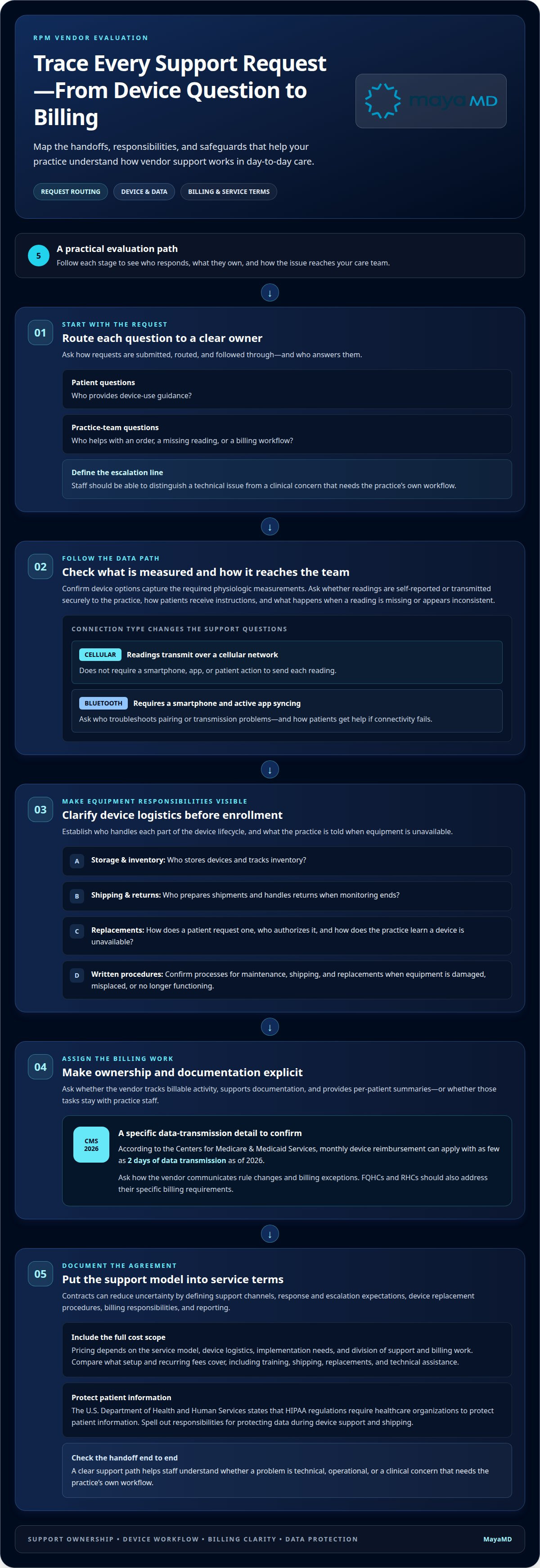
During vendor evaluation, map who answers each question and how it reaches your care team. A patient may need device-use guidance, while staff may need help with an order, a missing reading, or a billing workflow. Ask how each request is submitted, routed, and followed through. A clear escalation path helps staff distinguish a technical issue from a clinical concern that requires their own workflow.
Start with the data your program needs. Ask which device options capture the required physiologic measurements and whether readings are self-reported or transmitted securely to the practice. Confirm how patients receive instructions and what happens when a reading is missing or appears inconsistent. The collection method affects the patient’s steps, the data reaching the team, and the support questions staff may need to resolve.
Connectivity affects the support burden. Cellular-connected devices can transmit readings over a cellular network without requiring a smartphone, app, or patient action to send each reading. Bluetooth-dependent devices require a smartphone and active syncing through an app. Ask which connection type each device uses, who troubleshoots pairing or transmission problems, and how patients get help when connectivity fails.
Clarify device logistics before enrollment. Establish who stores devices, tracks inventory, prepares shipments, and handles returns when monitoring ends. Ask how a patient requests a replacement, who authorizes it, and how the practice learns that a device is unavailable. Written procedures for maintenance, shipping, and replacements reduce uncertainty when equipment is damaged, misplaced, or no longer functioning.
Billing support requires equally clear ownership. Ask whether the vendor tracks billable activity, supports documentation, and provides per-patient summaries, or leaves those tasks to practice staff. According to the Centers for Medicare & Medicaid Services, monthly device reimbursement can apply with as few as 2 days of data transmission as of 2026. Confirm how the vendor communicates rule changes and billing exceptions; FQHCs and RHCs should also address their specific billing requirements.
What are the costs of RPM vendor customer support, including setup and ongoing fees? Pricing depends on the service model, device logistics, implementation needs, and the division of support and billing work; the amount is provided after a quote request. Compare what setup and recurring fees cover, including training, shipping, replacements, and technical assistance.
Inadequate support can leave patients unable to transmit readings, delay staff response, or create gaps in billing documentation. Contracts can address these risks by defining support channels, response and escalation expectations, device replacement procedures, billing responsibilities, and reporting. The U.S. Department of Health and Human Services states that HIPAA regulations require healthcare organizations to protect patient information, so spell out responsibilities for protecting data during device support and shipping.
Outsourced technical support and its location
Support may come from the vendor’s own employees or an external service team. Neither structure alone shows how effectively issues will be resolved. Ask who receives a ticket, who owns it through closure, and whether the same team supports your monitoring platform, devices, and integrations. A login problem and a missing data feed, for example, may require different technical skills.
Support location can affect working-hour overlap, communication, and escalation. Ask where frontline support is based and which locations handle advanced technical issues. Compare those hours with your practice’s workflow, including enrollment periods and when staff review monitoring data. Patient engagement issues during clinic hours need a clear route to someone who can help.
Request a walkthrough of the support process using a specific example. If a patient cannot access an app, identify who responds, how staff can escalate the case, and how resolution is recorded. If an integration stops sending information, clarify whether support can investigate the interface or must transfer the issue to another team. The handoff should preserve the issue details and identify who owns the next step.
Ask how the vendor prepares outsourced staff to support healthcare organizations. Useful details include training on the platform, device workflows, escalation criteria, and handling patient information. Ask what information agents can access while troubleshooting and how access is controlled. The goal is to understand the support process, rather than assume an outside team has the same context as your provider.
Communication should work for both staff and patients. Ask which channels support uses, such as a ticket portal, phone line, or secure messaging, and how patients are directed to the right one. If chronic care management involves patients with different language or technology needs, clarify how the support model handles those interactions. A defined process reduces unnecessary transfers among patients, the practice, and the technical team. For organizations evaluating how automated messaging channels and AI-enabled support systems integrate into broader operations, interaflow.ai offers insight into deploying integrated communication solutions.
Use a practical scenario during vendor discussions. Describe a patient who stops transmitting readings and ask the vendor to explain each step, from intake through resolution and notification to practice staff. Then ask how the process changes for a system-wide integration issue. These examples reveal whether the vendor has clear ownership, escalation procedures, and communication that fits your clinical workflow.
Document the agreed support model in the service terms, including the responsible teams, coverage hours, escalation route, and communication expectations. Revisit those details when your patient population or monitoring workflow changes. Organizations shaping patient engagement alongside chronic care monitoring can discuss their care-program needs through a focused conversation about operational fit.
3. 24/7 Availability
Around-the-clock technical support can matter when a remote monitoring issue surfaces outside clinic hours. A vendor may offer 24/7 technical support, but that does not mean clinical staff review readings or respond to alerts continuously. Separate these service models before comparing vendors. For example, ask whether overnight availability covers login failures, device connectivity, platform outages, or clinical escalation.
Define the support boundary for each workflow. If a patient with chronic conditions cannot submit a blood pressure reading at night, determine whether the vendor troubleshoots the device or directs the patient to the practice. Ask who receives an alert, who evaluates its clinical significance, and what happens if the usual care team is unavailable. Technical assistance and clinical care management are distinct responsibilities.
Availability also needs a clear route. Identify the channels patients and staff can use after hours, and clarify whether they reach an agent, an answering service, or a ticket queue. Ask how urgent technical problems are escalated and how updates reach your team. Test the process with a realistic scenario, such as a patient unable to connect a device before a scheduled reading.
Ask the vendor to define coverage across holidays, weekends, and time zones. A stated 24/7 service should specify which functions remain available during each period. For instance, a platform may allow patients to submit readings continuously while technical agents handle issues through a separate channel. Knowing that distinction helps organizations set accurate expectations for patients and staff.
Connect availability to your monitoring model. A software platform that provides dashboards may leave alert review and patient outreach to practice staff. A more supported arrangement may assign some engagement tasks to the vendor. In either model, establish how after-hours device problems affect the next-business-day workflow, who documents unresolved issues, and who informs the provider.
Availability can also affect reimbursement processes indirectly. If technical issues prevent data transmission or interrupt documentation workflows, staff need a defined way to record and resolve the disruption. Ask how support tickets are tracked, what information appears in the record, and how the practice receives closure details. A technical support line is not a substitute for billing guidance or clinical judgment.
Put the agreed scope in the service terms. Specify covered channels, hours, escalation paths, issue ownership, and patient communication. Review a sample support interaction before enrollment begins. A clear distinction between continuous technical access and clinical response helps your practice choose a model aligned with its staffing, patient population, and chronic care management workflow.
4. Customer references and case studies
References show how support works after an RPM program moves beyond implementation. Ask for a practice that has been live for at least 12 months, then discuss its experience with the vendor’s support team. A mature program can reveal whether communication, issue resolution, and patient monitoring workflows remain consistent over time.
How do leading RPM vendors compare on customer support and customer satisfaction? Service models differ, so compare documented support processes and feedback from practices with similar needs rather than relying on unsupported rankings. Ask each reference about responsiveness, issue ownership, and whether the care team can reach the right support channel.
Choose references that resemble your organization. A clinic managing chronic conditions may have different needs from a practice with another patient population or staffing model. Ask about the reference site’s monitoring workflow, patient engagement approach, and division of work between vendor and staff. These similarities make feedback more relevant to your own operating decisions.
Use the same questions with every reference. Ask what happened when readings stopped arriving, whether the vendor communicated clearly, and how the practice resolved the issue. Ask how patient questions were handled and whether staff received useful updates. Specific examples reveal more than a general statement that support was satisfactory.
Case studies need the same scrutiny. Identify the program’s starting point, patient group, included services, and measurement period. If a case study reports improved engagement or revenue, ask how each outcome was defined and what data supports it. Separate vendor activities from changes made by the practice so the results are not attributed to support alone.
Review implementation and ongoing performance separately. A strong launch story may not show how the vendor handles routine issues months later. Ask a long-term customer whether training was available when staff roles changed, how support handled workflow adjustments, and whether the vendor communicated operational changes. These questions show how the relationship works after onboarding.
References can also clarify practical details missing from a case study. Ask whether the customer’s care team still performs tasks the vendor initially expected to support, and whether patient monitoring requires more staff coordination than anticipated. A reference can explain, for example, how its team follows up when patients stop engaging with the program.
Record each reference’s examples against consistent criteria: response process, communication quality, issue resolution, patient engagement, and fit with your clinical workflow. Note where experiences differ and what conditions might explain those differences. This structured comparison helps your organization interpret testimonials as operational evidence, not as a substitute for understanding the support model.
5. Implementation support, training, and customer service responsiveness
Implementation determines how remote patient monitoring fits existing clinical operations. Ask the vendor to map each phase, from eligibility review and patient outreach through onboarding, enrollment, and launch. A software-only model may leave enrollment to practice staff, while a managed partner may support those activities. Define the division of work before setting internal staffing expectations.
Build the implementation plan around your population and chronic care workflows. Identify who configures the program, prepares staff, supports patients, and coordinates EHR integration. A practice enrolling patients across multiple locations, for example, may need a consistent onboarding process and role-specific training. Ask how workflow changes are documented and communicated to staff during rollout.
Training should prepare each role for its actual tasks. Request a staff learning plan covering platform navigation, patient enrollment, monitoring workflows, documentation, and escalation procedures. Ask whether tutorials remain available after launch and how new team members access them. Vendors may assist staff with placing orders and provide tutorials and assistance without additional fees, so clarify what support is included.
Patient guidance deserves its own plan. Ask who helps patients use devices, what support channels are available, and whether device-use assistance is offered in multiple languages. A patient who cannot complete onboarding may need different help from a staff member learning a dashboard. Define how those requests reach the appropriate team and how unresolved issues are routed back to practice staff.
What are typical RPM vendor customer support response times and service-level agreements? Response expectations depend on the issue and coverage model. An SLA should define acknowledgment, triage, escalation, and resolution targets by severity, and distinguish routine requests from problems that interrupt patient onboarding or data flow.
What questions should healthcare providers ask when evaluating an RPM vendor’s support team? Ask who handles enrollment, monitoring, documentation, billing support, compliance workflows, device assistance, and EHR integration. Then ask how the vendor tracks requests, communicates ownership, and reports unresolved issues to your care team.
Set a realistic timeline. The toolkit recommends adding 4 weeks to a vendor’s stated implementation timeline, allowing your planning to account for workflow coordination and integration tasks. Ask which dependencies can affect launch, who owns each dependency, and how schedule changes are shared with your team.
Before launch, run a scenario with the vendor, such as onboarding a patient who needs extra device guidance. Check whether staff can locate training materials and identify the escalation path. To discuss how digital support can fit your care workflows, connect with the team about your implementation needs.
MayaMD
MayaMD supports healthcare organizations building connected digital care workflows. If your evaluation highlights a need for stronger patient communication alongside remote monitoring, MayaMD’s AI patient engagement solutions support patient interactions, while the Clinical AI Agent provides a digital point of connection within care workflows. Automated post-discharge communication solutions can also help practices maintain communication as patients transition from hospital to home.
These offerings complement, rather than replace, a practice’s assessment of vendor support responsibilities, escalation paths, and implementation needs. Consider MayaMD when your organization is planning how digital tools can fit its patient engagement and care delivery model. Contact MayaMD to discuss your organization’s needs.
Turn your evaluation into an operating plan
Choosing an RPM partner begins an operational relationship. Before making a decision, align clinical, technical, and administrative leaders on what a successful program must enable. This shared definition can guide implementation priorities and keep future decisions connected to patient care.
Use your evaluation of RPM vendor customer support to establish how the relationship will adapt as workflows evolve. A new patient population, revised care pathway, or change in staff responsibilities can affect how support fits your practice. Set a regular time to review whether the service model still meets your organization’s needs, and document decisions so teams share the same expectations.
MayaMD’s digital healthcare solutions can contribute to a broader approach to patient communication and care delivery. If you’re considering how these capabilities could fit your organization’s plans, start a conversation with MayaMD about your RPM support needs. A deliberate next step can help your team move forward with clarity.
Frequently Asked Questions
What should I look for in an RPM vendor?
Look for a service model that fits your clinical workflows, patient population, and internal capacity. When evaluating RPM vendor customer support, consider how the vendor documents responsibilities and handles operational changes after launch. Assess whether its monitoring approach aligns with your care pathways and how staff can use program information in daily decisions. Request examples relevant to your organization, not just a general product demonstration.
Can You Recommend Some Reliable RPM Platforms For Healthcare Providers?
A suitable platform depends on your population, care goals, and the support responsibilities your organization needs. Compare vendors using consistent criteria, including patient engagement, workflow fit, implementation approach, and relevant customer experience. MayaMD provides remote patient monitoring for chronic care management alongside digital healthcare solutions. Consider whether those capabilities fit your program, then assess the operating model as part of your broader evaluation.
Can the vendor manage tech support?
Yes, an RPM vendor may manage technical support, though the scope depends on the service arrangement. Clarify which issues its team can resolve directly and which require another party, such as your EHR or network support team. Ask who coordinates an investigation when a data exchange issue spans the RPM platform and an existing clinical system. Clear ownership helps prevent unresolved cases from moving between teams.
What customer support services do RPM vendors provide?
Support may include platform assistance, device-use guidance, patient onboarding help, staff education, and operational coordination. The specific mix varies by vendor and contract. Ask which services are delivered to patients, which are reserved for practice staff, and how each request is documented. A vendor may provide patient instructions while your care team handles clinical decisions. A responsibility matrix makes these boundaries easier to apply.
How can I evaluate an RPM vendor’s technical support and device troubleshooting?
Use a realistic test case and trace the issue from report to resolution. Describe a patient who cannot complete a device reading, then ask what information support needs, how it identifies the likely problem, and how it updates staff. When evaluating RPM vendor customer support, determine whether troubleshooting distinguishes user error, connectivity trouble, and a platform issue. A clear record shows the outcome and any remaining action.
How do RPM vendors handle after-hours, weekend, and emergency support?
Coverage varies, so distinguish technical assistance from clinical response and emergency care. Ask which channels remain available outside routine hours, what issues they handle, and how urgent concerns reach your practice’s designated clinical workflow. A technical team may help restore platform access, while a clinical alert follows a separate escalation process. Make sure patient instructions align with your organization’s established emergency procedures.
How do RPM vendors train staff and support EHR integration and workflow issues?
Effective preparation combines role-specific instruction with testing the actual workflow. Ask how staff learn their assigned tasks, where they can access reference materials, and how training changes when procedures are revised. For EHR integration, define who validates exchanged information, how errors are reported, and how teams coordinate fixes. A structured walkthrough using representative scenarios can reveal gaps before staff rely on the process. A framework for evaluating RPM vendor customer support should include these integration and training responsibilities.
What are typical RPM vendor customer support response times and service-level agreements?
Set response and escalation expectations in the service terms, including support channels, coverage hours, and who owns each issue through resolution. Separately, the toolkit recommends that an RPM nurse review alerts received during the business day within 4 hours; this is an alert-review guideline, not a vendor technical-support response time.




See The MayaMD Difference
Fill the form below
Download Our Apps
MayaMD for patients and MayaPro for physicians - available on iOS and Android.
FOR PATIENTS
MayaMD App
AI-powered symptom assessment, triage, and secure access to your care team.


FOR PHYSICIANS
MayaPro App
MayaPro brings patient vitals, RPM/PCM care plans, and clinical decision support to your pocket.