
RPM Device Troubleshooting for Patients and Care Teams

A remote patient monitoring reading is useful only when the device is used correctly and the data reaches the care team. Common RPM devices include blood pressure monitors, glucometers, pulse oximeters, and scales; wearable sensors may also track heart rate, temperature, and sleep patterns. Knowing how to handle RPM device troubleshooting for patients starts with working out whether an unusual reading reflects measurement conditions, a connection problem, or a device fault.
An unexpected reading or a device that stops transmitting can raise questions. Patients and care teams can respond more confidently when they know what the device measures, how to repeat or report a result, and what to do when connectivity or routine device care interrupts monitoring.
This guide covers how common RPM devices collect and transmit data, what can affect readings, and how to approach connection problems, charging, maintenance, privacy, and coverage questions. It also explains when to follow the care team’s instructions and when a new symptom or device malfunction calls for contacting the provider.
Key Takeaways
• Common RPM devices include blood pressure monitors, glucometers, pulse oximeters, and weight scales; follow the care team’s instructions for the device and measurement schedule.
• Movement, temperature, and storage conditions can affect readings, so learn the correct measurement technique and the thresholds that guide your next step.
• Bluetooth, Wi-Fi, or cellular connections may transmit readings; charging, device upkeep, and reporting a malfunction help the care team respond to missing data.
• Protect device and account access, and understand how health data is handled within your RPM program.
• Coverage for monitoring varies by insurance; ask the provider’s office what the plan covers and what costs may apply.
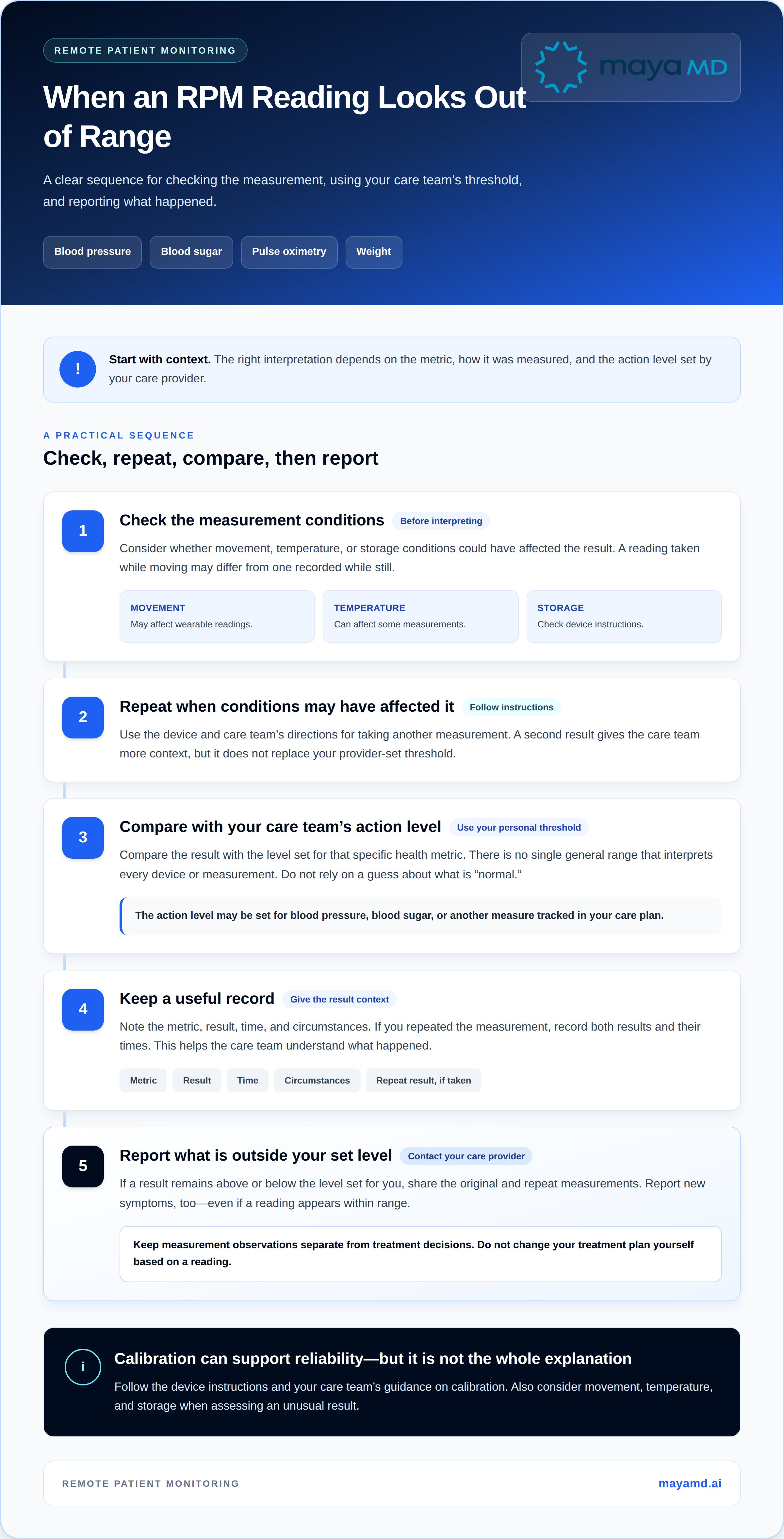
Recognizing out-of-range readings and possible causes
An out-of-range measurement needs context: the device, measurement conditions, and threshold set by the care provider all matter. Monitoring works best when patients know which readings to repeat and which to report promptly. Clear instructions on how to handle RPM device troubleshooting for patients turn an unexpected result into a practical next step.
Compare the result with the range or action level set for that specific health metric. A blood pressure monitor, glucometer, pulse oximeter, and scale each measure something different, so one general range cannot interpret them all. Movement, temperature, and storage can affect wearable readings, including heart rate, body temperature, and sleep patterns. For example, a reading taken while moving may differ from one recorded while still. Note the metric, time, and circumstances, then follow the care team’s instructions. A new symptom matters even if the reading appears within range.
Repeating Readings Before Escalation
Repeat a reading when the first result may have been affected by how or when it was taken. A second measurement gives the care team more context, but it does not replace the provider’s threshold. Follow the device and care team’s instructions, and record both results and their times. Contact the care provider if a reading is above or below the level set for you.
Use the provider-set threshold as your decision point, not a guess about what is normal. If a result remains outside that level, report the original and repeat measurements instead of changing your treatment plan yourself. Report new symptoms to the care provider, too; you do not need to wait for an abnormal reading. Include the metric, result, time, and whether you repeated it. This context helps healthcare providers decide on appropriate follow-up. A practical approach to how to handle RPM device troubleshooting for patients keeps device observations separate from treatment decisions.
Calibration and Reading Interpretation
Calibration checks or adjusts a device so its measurements remain aligned with its intended operation. Follow the device instructions and care team’s guidance on calibration. It can support more reliable monitoring, but it will not explain every unusual result. Consider movement, temperature, and storage alongside calibration when assessing a variation.
Interpreting a reading also depends on the metric and care plan. A provider may set an individual action level for blood pressure, blood sugar, or another tracked measure; compare your result with that level rather than relying on a traditional idea of “normal.” Guidance on how to handle RPM device troubleshooting for patients should also explain how often to measure and what to do with an out-of-range result. Clear instructions link the technology to a consistent response and help patients discuss their health with the care team, a priority emphasized by general practice clinics such as hatmed.co.za to ensure vital readings inform ongoing care.
Connected RPM devices and data transmission
RPM equipment measures health data at home and transfers it to a healthcare team for review. Blood pressure, heart rate, weight, and other measurements can support monitoring between appointments. The connection method determines how a reading travels from the device to the clinician’s view, and where a break in that path might occur.
RPM devices can transmit data through Bluetooth, Wi-Fi, or cellular technology. Bluetooth typically connects a measurement device to a nearby phone or tablet, while Wi-Fi connects compatible equipment through a home network. Cellular-enabled systems can send readings without Wi-Fi. Data may then reach a physician’s office through a telehealth computer system or software on a computer, smartphone, or tablet. The exact route depends on the equipment and program.
If readings do not appear as expected, identify where transmission stopped before taking unnecessary repeat measurements. Check whether the device shows a completed reading, whether its paired phone or tablet is nearby, and whether the expected connection is available. A Wi-Fi interruption may delay transfer; a cellular-enabled system uses its cellular connection instead. Note where the process failed and share that detail with the care team.
How RPM Data Fits an EHR or EMR
An electronic health record (EHR) or electronic medical record (EMR) can include remote measurements in a clinic’s broader patient record when the RPM platform is connected to that system. This lets physicians review home readings alongside other information used in care. The display and routing vary by system, so follow your program’s instructions for submitting measurements and reporting missing data.
A connection alone does not explain what a reading means. RPM data and analytics can help healthcare providers identify patterns across measurements instead of viewing each result in isolation. For example, a series of weight readings may show a change over time, while a single result offers only a snapshot. Clinicians can use patterns to decide whether follow-up is appropriate and prepare more focused appointment discussions.
Daily routines affect how useful the data is. Taking measurements at the instructed time with the assigned device creates a more consistent record for review. Lifestyle changes, missed readings, or a change in connection may help explain gaps or shifts in a trend. Report these details rather than assuming the digital record tells the whole story.
Healthcare organizations assessing how remote readings move into existing workflows can discuss RPM data connectivity as part of their care delivery planning.
Device management and vendor support
Reliable remote monitoring depends on routine device care and a clear support process. Follow your healthcare team’s instructions for the assigned device, including how to use, charge, and maintain it. A blood pressure monitor, for example, may need charging or a battery replacement before a scheduled measurement. If it stops working, contact the care provider and describe what happened. Do not substitute another device or change the monitoring schedule without guidance.
Keep device support practical. Note the device type, the problem, and whether it powers on or displays an error. If a reading has not reached the care team, include when you took it and whether the device showed completion. These details help distinguish a measurement issue from a transmission problem. Follow your program’s instructions for vendor support, and keep the care provider informed if monitoring remains interrupted.
Caregiver Reassurance and Support
A caregiver can help a patient follow the established routine without interpreting readings or changing care instructions. For someone managing a chronic condition, this might mean locating the charger, positioning a blood pressure cuff as instructed, or recording an error message. Clear roles reduce confusion: the patient or caregiver reports a device problem, and the care provider advises on next steps and clinical concerns.
Offer specific reassurance, not a promise that every reading or connection will work. A caregiver can explain that a missing transmission is a device-management issue to report, while a concerning reading or new symptom should be handled according to the care team’s clinical instructions. If the patient feels overwhelmed, focus on one task at a time, such as charging the device or finding the support instructions. This makes monitoring easier to manage while keeping potential health concerns in view.
Staff Training and Support
Staff training should cover the device workflow, from patient onboarding through routine use. Demonstrate how to operate and charge the assigned monitor, recognize an error, and report a malfunction. Then ask the patient to explain the steps back in their own words. For a blood pressure device, confirm that the patient understands the instructed measurement process and knows whom to contact if the monitor stops working.
Care teams need a consistent process for handling device questions. Training can clarify who receives malfunction reports, how missing readings are documented, and when clinical concerns need escalation. A clear remote monitoring workflow helps staff distinguish technical support from care decisions. If a device issue persists, the team can guide the patient through the program’s support process and explain what to expect from monitoring.
In chronic care management, the aim is consistent use, clear communication, and timely reporting, not troubleshooting beyond the patient’s instructions. A report of a failed charge or blank display gives the team a practical starting point. Staff can explain the next support step, adjust the monitoring routine when appropriate, and keep device management connected to the patient’s care plan.
What privacy and security precautions should patients follow when using RPM devices?
Remote patient monitoring involves health information moving between a device and a care team. RPM wearable-device data is confidential and protected by HIPAA regulations. Patients can help safeguard that information by protecting the phone, tablet, or account used with their monitoring program. A blood pressure reading, glucose result, or heart rate measurement can reveal personal health details, so treat the device and its connected technology as part of your health records.
Follow the instructions supplied for the assigned device and app. Use the account and application intended for your RPM program, and do not share sign-in details through text or email. If a family member helps with the device, agree on how they will access it and its information. For example, a caregiver may help charge a monitor without needing the patient’s account password. Tell the care team if someone else needs help accessing the program.
Protect the device, too. Keep a paired smartphone or tablet with you or in a secure place, and use its screen-lock setting. Do not leave a logged-in device where visitors or household members can view readings. If the device is shared, sign out of the program when finished if that option is available. These habits reduce casual access to health data without interrupting the measurement routine.
Review the recipient
Before sending a reading or message, confirm it’s going to the RPM program or care team you use.
Limit unnecessary sharing
Don’t post readings or screenshots from the monitoring app on public social media.
Report access concerns
Contact the care team if a device is lost, an account seems accessible to someone else, or unexpected messages request health information.
Keep instructions available
Store the program’s device and privacy guidance somewhere private, so you can follow it when questions arise.
Be alert to unusual requests. A message asking for a password, payment details, or a code is not a routine device alert. Use the contact method provided by your care program to report suspicious messages. If a phone is lost, tell the care team which device and account were involved; they can explain the appropriate next step. Do not send a health reading to an unrecognized number just because the request mentions your monitoring device.
Privacy also depends on clear expectations. During enrollment, ask which device or app sends readings, who on the care team reviews them, and how to report a concern. This helps you understand how information moves without confusing a technical problem with a health alert. If a new symptom or concerning measurement occurs, follow the care team’s clinical instructions; privacy precautions should not delay reporting a health concern.
Does Medicare or insurance cover RPM device support, replacements, or troubleshooting?
Coverage depends on the type of remote monitoring and the insurance plan. Medicare covers some remote monitoring, and private insurers may cover some services as well. That alone does not establish whether a particular plan pays for device troubleshooting, replacement equipment, or a specific support service. Treat coverage for monitoring separately from the question of who handles a broken monitor or connection problem.
For Medicare beneficiaries, coverage of some remote monitoring services does not resolve every device-related cost question. A replacement blood pressure monitor, help restoring a connection, and clinical review of transmitted readings are different needs. The plan’s terms and the patient’s RPM arrangement determine which costs apply. The provider’s office can explain what the patient’s insurance covers and what they may need to pay.
Private insurance coverage also varies. One plan may cover certain remote monitoring services, while another has different terms. Ask the provider’s office about the specific service and device problem rather than assuming an RPM program includes every repair or replacement. For example, ask whether the plan addresses a failed monitor, a lost device, or help restoring transmission. These are separate questions, even when they disrupt the same monitoring routine.
Medicaid reimbursement differs by state. Thirty-seven state Medicaid programs offer reimbursement for remote patient monitoring. This describes programs that offer reimbursement, not a guarantee that every patient’s troubleshooting, replacement device, or support expense is covered. The applicable state program and individual coverage determine the details. The provider’s office can explain how coverage applies to the monitoring service and device concern.
Before discussing a charge, identify the issue. Note which device is involved, whether it still works, and what support you need. Then ask the provider’s office:
• Does the patient’s plan cover the RPM service being used?
• Does coverage address troubleshooting or a replacement device?
• What amount, if any, may the patient need to pay?
• Does the answer differ for Medicare, private insurance, or Medicaid?
Clear questions help separate insurance coverage from the technical next step. If the device has stopped working, follow the care team’s instructions and report the malfunction, even while coverage is being clarified. A billing question should not delay reporting a device failure or health concern.
Healthcare organizations building RPM workflows can discuss remote monitoring program support and how patient communication fits into care delivery.
MayaMD
MayaMD supports remote patient monitoring for chronic care management, helping care teams maintain continuity between scheduled visits. When device questions, missed transmissions, or unclear instructions create communication gaps, MayaMD’s AI patient engagement solutions can help care teams stay connected with patients. Its platform supports remote monitoring and care management as part of the broader clinical workflow. It complements, rather than replaces, the care team’s guidance on abnormal readings, device faults, and clinical concerns.
For healthcare organizations shaping RPM communication and chronic care workflows, contact MayaMD to discuss how its solutions may fit your program.
Make RPM Support Part of the Care Workflow
A durable RPM program treats patient questions as part of care delivery, not as interruptions. Teams can define how device concerns, communication needs, and clinical questions move through existing workflows, giving patients a clearer path to support. That is a practical next step in deciding how to handle RPM device troubleshooting for patients across different care settings.
MayaMD’s Clinical AI Agent, AI patient engagement solutions, and automated post discharge communication solutions support patient communication within healthcare workflows. These capabilities can help organizations connect ongoing monitoring with patient engagement and transitions in care.
Consider where clearer communication could strengthen your RPM approach. Contact MayaMD to discuss RPM support, and take the next step toward a more coordinated patient experience.
Frequently Asked Questions
What does remote patient monitoring (RPM) device troubleshooting involve?
RPM troubleshooting means identifying whether a problem involves the measurement, the device, or how information reaches the care team. For example, a completed blood pressure reading that does not appear in the monitoring record points to a different issue than a blank device display. Note what happened and when, then follow the program’s instructions. Troubleshooting does not replace clinical assessment or advice about symptoms.
What should patients check first when an RPM device stops working?
Start with the device display and your monitoring program’s instructions. Confirm that you are using the assigned equipment and following the expected measurement schedule. Look for an error message or indicator, then consult the device guidance before attempting a reset. If the equipment remains unusable, report the problem to your care team and describe what the device shows.
How do patients troubleshoot RPM weight scales, pulse oximeters, and glucose meters?
Follow each device’s instructions because placement, supplies, and measurement steps differ. For a scale, follow the setup and positioning guidance. For a pulse oximeter, check the specified sensor placement and fit. For a glucose meter, use the supplies and procedure specified for that model. Do not substitute parts or change the measurement method to force a result. Report persistent errors to your care team.
How can patients fix Bluetooth, Wi-Fi, cellular, or app pairing problems with RPM devices?
First identify the connection method your RPM program uses. For Bluetooth pairing, keep the assigned device and paired phone within the range described in their instructions. For Wi-Fi, confirm that the expected network is available. For an app, check that you are signed into the account used for monitoring. Do not remove a pairing or reinstall software unless the program instructions say to, as this may interrupt the established connection.
What should patients do if RPM readings are inaccurate, missing, or not syncing?
Keep the original result and its measurement time; do not edit or delete it. If the reading seems inaccurate, follow your care team’s directions for taking another measurement and record the new result separately. If a reading is missing from the monitoring record, report the gap and whether the device showed completion. This helps the team determine whether the concern involves measurement, transmission, or record display.
When should patients contact their RPM care team or device manufacturer for help?
Contact the care team if the device stops working, readings repeatedly fail to appear, or you are unsure how to follow your monitoring instructions. Include the device type, any displayed error, and what you have already tried. For a hardware or operation question, use manufacturer support only as the program directs. Send clinical questions, new symptoms, or concerns about a measurement to your healthcare provider.
What RPM device problems require urgent medical care rather than troubleshooting?
Urgent symptoms take priority over a device fault. If you feel severely unwell or your symptoms are rapidly worsening, seek urgent medical care rather than waiting to restore a connection or repeat a measurement. Contact your healthcare provider about new symptoms even if the device appears to be working; primary care providers like Sage Creek Medical Center emphasize that digital monitoring tools are meant to support, not replace, timely in-person evaluation. A monitor provides information, but it cannot determine whether a symptom needs immediate assessment.
How should patients clean, maintain, charge, and replace RPM devices and supplies?
Follow the cleaning, charging, and storage instructions for your specific device, as methods differ between monitors and accessories. Use only the supplies specified for your equipment, and report damaged cables, cracked housings, or recurring power problems to the care team. Before replacing a device or supply, ask how to arrange the replacement within your monitoring program. Do not discard equipment until the team explains whether it is still needed.




See The MayaMD Difference
Fill the form below
Download Our Apps
MayaMD for patients and MayaPro for physicians - available on iOS and Android.
FOR PATIENTS
MayaMD App
AI-powered symptom assessment, triage, and secure access to your care team.

FOR PHYSICIANS
MayaPro App
MayaPro brings patient vitals, RPM/PCM care plans, and clinical decision support to your pocket.