
How to Reduce No-Show Rates With Patient Engagement Tech

As many as 30% of patients may miss their healthcare appointments, leaving care gaps and unused appointment time. A practical approach to how to reduce no-show rates with patient engagement tech combines timely reminders with convenient ways to confirm, cancel, or reschedule. The aim isn’t simply to send more messages; it’s to make the next step clear and accessible to each patient.
No-shows can affect practice finances and continuity of care, but the best response depends on why patients miss visits. This article explains how reminder timing and channel choices can support attendance, how to assess performance, and how to evaluate the impact of missed appointments. It also shows how follow-up and patient engagement workflows can help practices spot patterns and respond consistently.
Key Takeaways
• Pair reminders with a clear way to confirm, cancel, or reschedule so patients can act without unnecessary friction.
• Use voice, text, chat, and email thoughtfully, matching communication channels to patient preferences and workflow needs.
• Make online scheduling changes straightforward, helping patients release appointments that someone else can use.
• Track no-shows, late cancellations, and recovered appointment slots separately to identify where engagement efforts can improve.
• Assess missed visits in terms of both operational capacity and potential financial impact to guide practical improvements.
1. How much do SMS reminders reduce no-shows?
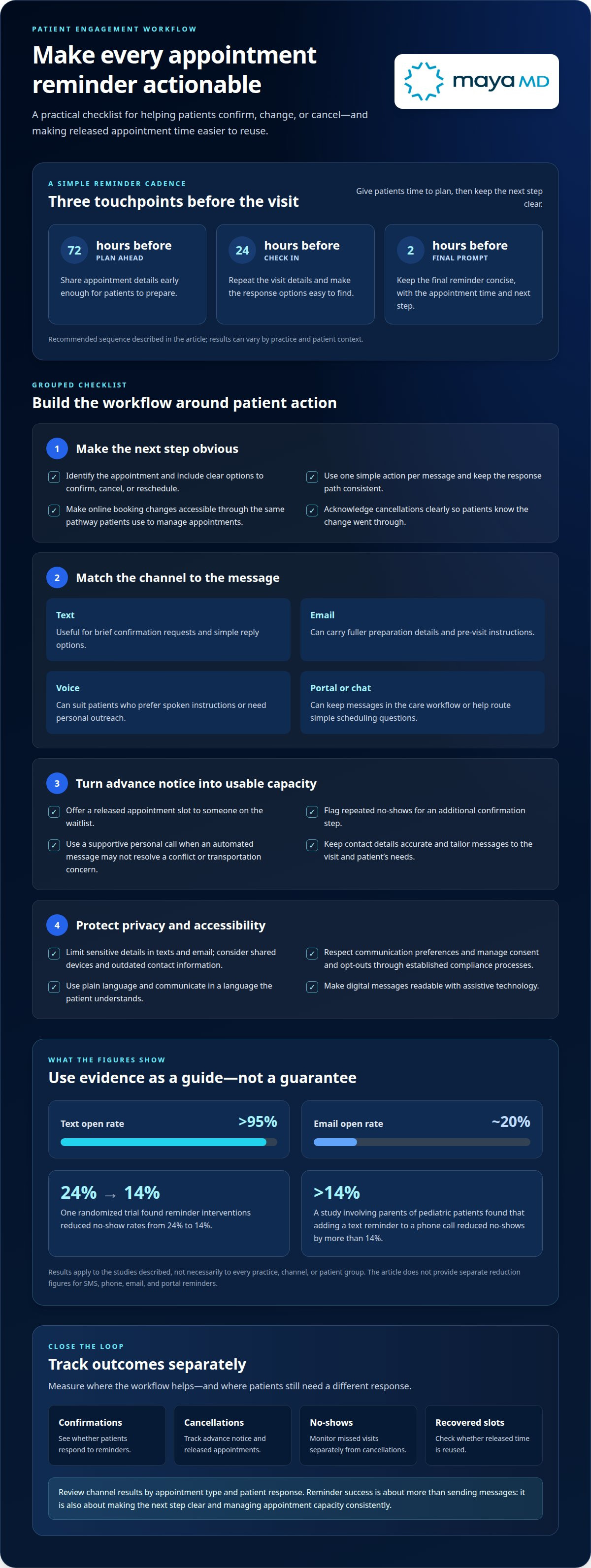
Reminders can improve attendance, but results depend on the intervention and patient context. One randomized trial found that appointment reminder interventions reduced patient no-show rates from 24% to 14%, according to the Authors of the cited randomized trial. That finding supports reminders as a useful strategy, but it doesn’t establish the same reduction for every practice or communication channel.
Build a reminder workflow around clear actions. Send appointment details early enough for patients to plan, then provide a simple way to confirm, cancel, or reschedule. A recommended sequence is 72 hours, 24 hours, and 2 hours before the appointment. Each message should identify the visit and explain what the patient can do next.
A confirmation is useful only if it changes what happens next. When a patient cancels by text, for example, acknowledge the cancellation clearly and offer the released slot to someone on the waitlist. This turns advance notice into a chance to use clinical capacity more effectively.
Use attendance history to identify patients who may benefit from extra outreach. Flag patients with repeated no-shows for an additional confirmation step. A personal call may uncover a scheduling conflict or transportation concern that an automated message cannot resolve. Keep the approach supportive, not punitive.
In the United States, HIPAA and TCPA considerations make privacy, consent, and message handling central to reminder workflows. Limit message content to what patients need, respect communication preferences, and manage consent and opt-out requests through the practice’s established compliance processes.
Patient engagement and automated reminder platform costs vary with the functionality, communication channels, integrations, and usage involved. Pricing is determined by the specific case and provided after a quote request.
There is no single reduction figure for SMS, phone, email, and patient portal reminders separately. The randomized trial result applies to reminder interventions overall, so practices should compare attendance by channel using their own appointment data.
Missed appointments affect more than revenue. They leave clinical time unused, disrupt staff workflows, and can delay care for patients waiting for an appointment. Track cancellations, no-shows, confirmations, and recovered slots separately. These measures show whether reminders improve attendance or simply make cancellations easier to manage.
2. Automated reminders across voice, text, chat, and email
A coordinated reminder system uses channels patients can access and respond to. SMS works well for brief confirmation requests; email can carry fuller preparation details, while voice calls suit patients who prefer spoken instructions. A patient portal can keep messages within an existing care workflow, and chat can offer a direct route to simple scheduling questions.
Channel performance can differ. Text open rates exceed 95%, compared with roughly 20% for email. A study involving parents of pediatric patients found that adding a text reminder to a phone call reduced no-shows by more than 14%. These figures support testing complementary channels, not assuming one format will work equally well for every patient.
Timing and customization matter. Schedule reminders in relation to the appointment, then tailor them to the visit type and the patient’s needs. A first-visit message might explain arrival instructions; a follow-up reminder might emphasize the appointment time and confirmation option. Keep contact details accurate and the call to action consistent across channels.
Digital reminders also bring privacy, accessibility, and language considerations. Limit sensitive details in texts or email, account for shared devices and outdated contact information, and make messages readable with assistive technology. Use plain language and communicate in a language the patient understands.
Payment reminders serve a different purpose from appointment reminders. Keep payment communications separate, explain the requested action clearly, and avoid making a payment prompt look like a clinical instruction. Digital payment tools can reduce administrative friction when patients can access them, but track payment outcomes separately from attendance and appointment confirmations.
Review channel results by appointment type and patient response, then adjust the workflow when confirmations remain low or patients report confusion. A structured review of patient communication can help identify workflow opportunities; discuss patient engagement needs.
3. Q: What is the most effective way to reduce patient no-shows?
The best approach makes keeping, changing, or canceling an appointment straightforward. Online scheduling lets patients act when it suits them, while easy rescheduling gives them an alternative to missing a visit. Limited availability, long waits, and difficult cancellation processes can all contribute to no-shows.
Convenience shapes expectations. In a surveyed group, 51% of patients believed scheduling a new appointment should take less than five minutes. A practice can reduce friction by showing available slots clearly, limiting unnecessary steps, and confirming the selected time before patients leave the scheduling flow.
Self-service should cover the full appointment lifecycle. Let patients book, view, cancel, or reschedule through the same accessible pathway. For example, a patient whose work schedule changes should be able to move an appointment without calling during clinic hours. A clear confirmation removes uncertainty about whether the change went through.
Make cancellation useful for both patients and the practice. Show a cancellation option alongside appointment details, then offer the released slot to another patient. A waitlist can help staff fill openings, and timely updates let patients know when an earlier visit becomes available. This turns advance notice into usable appointment capacity.
Weather disruptions also call for a clear rescheduling path. If a patient cannot travel safely during severe weather, an easy way to cancel or choose another available time can preserve the relationship and support continuity of care. Practices can communicate schedule changes directly and give patients an accessible way to respond.
Reduce uncertainty at each step. State the appointment date, time, location, and any necessary preparation in plain language. For specialized visits—such as commercial driver certifications highlighted by miamicdldotphysicals.com—clearly communicating required medical records and testing requirements ahead of time helps prevent avoidable cancellations. After a patient reschedules, send the revised details and remove the old appointment from active reminders. This prevents conflicting information and helps patients plan for the correct visit.
Scheduling data can show where patients encounter difficulty. Review where booking attempts stop, how often patients reschedule, and whether canceled slots are filled. If patients repeatedly request unavailable times, appointment access may be part of the problem, not just reminder frequency. Adjusting scheduling options can help reduce missed visits and lost revenue.
Explain how to change an appointment before patients need to do so. Include cancellation and rescheduling instructions in booking confirmations and patient-facing materials. When patients can respond early, staff have more time to offer the opening to someone awaiting care.
4. Benchmarking no-show, late-cancel, and recovery rates
Start with consistent definitions. Divide missed appointments by scheduled appointments, then multiply by 100 to calculate the no-show rate. Track late cancellations separately, because an appointment canceled with notice can still be offered to another patient. Record recovered slots separately to show whether the practice filled openings created by cancellations or missed visits.
Compare results with appropriate benchmarks, not a single universal target. A no-show rate below 5-8% is listed as a target for medical practices. For dental and eye-care practices, a 5-10% target can apply, depending on specialty, patient demographics, and scheduling volume—an area where capacity optimization solutions like turnup.world help front desks recover chair time. A rate above 15% signals that active intervention may be warranted.
How results compare depends on specialty, patient population, and appointment type. Review each group separately, since a practice-wide average can hide differences between services or patient cohorts. For example, compare follow-up visits with new-patient appointments and check whether particular scheduling patterns coincide with more missed visits.
Use the same calculation period and categories for each review. Assess performance monthly, then compare it with the previous period and the practice’s own target. If no-shows rise for one appointment type, examine lead time, reminder responses, and cancellation patterns before changing the broader workflow.
Follow up after missed appointments promptly. Contacting patients within 24 hours can help keep them engaged in healthcare and identify barriers, such as forgetting the appointment or difficulty arranging transportation. Use a supportive communication approach: offer a clear way to reschedule and document whether the patient responds.
Cancellation policies support planning when patients understand them in advance. Explain any applicable late-cancellation or no-show fees during registration and include the policy in paperwork. If the practice requires prepayment for certain services, communicate the terms clearly before booking. Track policy changes alongside attendance data to see whether outcomes shift.
A waitlist can turn cancellations into usable appointment time. When a patient cancels, identify people who want an earlier visit and offer the opening through the practice’s established communication channels. Track how many released slots are filled rather than counting every cancellation as recovered capacity.
Interpret measures together. A lower no-show rate may coincide with more late cancellations, while a stronger recovery rate may reduce unused appointment time without changing attendance. Reviewing no-shows, late cancellations, patient responses, and filled openings each month gives healthcare teams a clearer basis for adjusting reminders and follow-up.
5. Patient no-show rates and financial impact
The average patient no-show rate in the United States is about 23%. That figure provides context, not a universal target: outpatient rates typically range from 5% to 30%, depending on specialty, patient population, and location. A practice’s show rate is more informative when interpreted alongside its own appointment mix and trends.
Specialty differences are substantial. U.S. primary care practices have no-show rates of 5% to 8%, outpatient settings range from 20% to 30%, and behavioral health settings can reach 50%. Compare similar appointment types and patient populations before deciding whether a change in messages or scheduling is improving attendance.
The financial effect starts with the unused clinical slot. healthcare system loses $150 billion every year through no-shows. These estimates describe different scales of impact; they shouldn’t be treated as interchangeable measures for an individual provider.
Revenue is only part of the calculation. An unfilled visit can leave provider time and room capacity unused, while staff still prepare schedules and follow up. It can also delay care for someone awaiting an appointment. A close review of the workflow may reveal administrative work that continues even when the patient does not attend.
To estimate local exposure, count missed appointments over a consistent period and separate them by appointment type. Compare the count with completed visits, late cancellations, and recovered openings. This helps distinguish a low show rate from a weak recovery process, where patients cancel but the practice cannot fill the slot.
Assess attendance improvements against operational and financial outcomes. Track show rate alongside filled cancellations, staff follow-up, and patient responses. If a reminder change increases confirmations but also increases late cancellations, these measures show whether more appointments are ultimately being completed.
Telehealth can also affect attendance patterns. A study of telehealth visits at one primary and specialty care clinic found a 7.5% no-show rate between March and May 2020. The rate was four times lower than the clinic’s average in-office rate before the pandemic, but that single setting doesn’t establish the same result for every practice.
Use these measures to identify where engagement changes may improve access and reduce unused capacity. A clear baseline gives teams a way to assess whether communication changes lead to more completed visits. Discuss patient engagement strategies for a more connected appointment experience.
MayaMD: AI patient engagement solutions
MayaMD provides AI patient engagement solutions for healthcare organizations seeking more coordinated communication with patients. When reminder improvements point to a broader need for consistent engagement across care journeys, its Clinical AI Agent and automated post-discharge communication solutions can support that workflow.
Automated post-discharge communication can support follow-up after a patient leaves the hospital, extending engagement beyond appointment notifications. The right next step is to consider where communication gaps occur and which patient interactions need support.
Contact MayaMD to discuss your patient engagement needs.
Build a More Responsive Patient Experience
Lasting improvement begins when attendance is treated as a signal about the care experience, not just a scheduling metric. Use patient feedback to identify friction, assign clear ownership for responding, and apply those insights to workflow decisions. This creates a learning process that can adapt as patient needs and clinical operations change.
This perspective can guide how to reduce no-show rates with patient engagement tech: connect communication to meaningful follow-through, then assess whether the process supports access and consistent operations. Technology is most useful when it strengthens the relationship between patients and care teams rather than adding another disconnected task.
Choose a next step that fits your organization’s priorities, whether refining a communication workflow or planning broader engagement support. A focused discussion can help clarify where to begin and how capabilities may align with your care model. Contact MayaMD to discuss patient engagement and move forward with a clear, patient-centered plan.
Frequently Asked Questions
What Are the Impacts of No-Shows in Healthcare?
No-shows disrupt continuity of care, leave appointment capacity unused, and can delay access for other patients. They also create operational work: staff may prepare for a visit that never happens, then contact the patient and revise the schedule. For someone managing an ongoing condition, a missed visit can interrupt follow-up. Practices can assess these effects together by tracking care delays, unused slots, and follow-up workload.
How much do SMS reminders reduce no-shows?
SMS reminders have been associated with reductions in no-shows of up to 38%. That figure is a reported upper result, not a forecast for every clinic or appointment type. To evaluate local performance, compare attendance before and after introducing texts, while accounting for changes in patient mix and scheduling. Also track whether patients confirm, cancel, or reschedule, since those responses help explain the attendance result.
How much does a no-show cost?
The operational impact can include unused provider time and staff effort spent preparing for or following up after a visit. To estimate the effect on a practice, count missed appointments over a consistent period and compare them with the value of completed visits. Separate late cancellations from no-shows, since released appointments may still be filled.
Q: What is the most effective way to reduce patient no-shows?
A practical approach to how to reduce no-show rates with patient engagement tech starts with understanding why patients miss visits. Someone who forgets needs a different response from someone facing a scheduling conflict or access barrier. Pair reminders with simple ways to change an appointment, then use patient responses to guide follow-up. Review outcomes by appointment type so changes address specific points of friction.
Q: What makes a reminder tool effective?
An effective reminder tool connects accurate appointment information with a clear patient action. It should support confirmation and make it easy to report a conflict, so staff can respond before the appointment becomes an unused slot. Useful features include recording patient responses and routing exceptions into an appropriate workflow. Clear, accessible wording matters, especially when messages appear on shared devices or patients use assistive technology.
Which patient engagement technologies reduce appointment no-shows most effectively?
No single technology works best for every patient population. SMS, voice calls, email, chat, and patient portals each offer different ways to share information and receive a response. A clinic can select channels based on patient access, communication preferences, and visit workflows. For example, a portal may suit patients who already use it, while a text can offer a direct way to confirm or request a schedule change.
What is the evidence for automated two-way texting and appointment confirmation?
Research supports appointment reminder interventions, while a particular two-way texting workflow should be assessed on its own outcomes. Two-way messages can capture confirmations, cancellations, and rescheduling requests, giving a practice more operational detail than a one-way notification. Track those responses alongside attendance rather than treating confirmation alone as proof that the patient attended. This distinction helps teams evaluate the workflow’s practical value.
How should clinics time and schedule patient appointment reminders?
Schedule reminders in relation to the visit date and the time patients need to prepare, using a consistent cadence across appointment types. Keep each message focused on one useful action, such as confirming attendance or requesting a change. For visits that require preparation, send instructions early enough to review, then make essential appointment details easy to find in later messages. Replace old details promptly after rescheduling to avoid conflicting updates.




See The MayaMD Difference
Fill the form below
Download Our Apps
MayaMD for patients and MayaPro for physicians - available on iOS and Android.
FOR PATIENTS
MayaMD App
AI-powered symptom assessment, triage, and secure access to your care team.


FOR PHYSICIANS
MayaPro App
MayaPro brings patient vitals, RPM/PCM care plans, and clinical decision support to your pocket.