
Best Practices for Training Staff on PCM Workflows

What if the main barrier to consistent PCM workflows isn’t staff effort, but different expectations about what each step requires? The best practices for training staff on PCM workflows start with a shared, patient-centered process that clarifies who does what, what belongs in the record, and when a concern needs escalation. That clarity matters when training has to fit around patient-facing responsibilities and teams need to demonstrate readiness, not just attend a session or learn the software.
A practical training program connects each role’s tasks to the care goals they support. It gives staff opportunities to apply the workflow, receive feedback, and show they can document, escalate, and follow up consistently across shifts. It also builds reinforcement into daily work instead of treating training as a one-time event.
This article explains how to build role-based training, assess competency using observable criteria, and use ongoing review to improve the process. Digital tools, including MayaMD’s Clinical AI Agent, can support patient engagement and clinical documentation while trained staff retain appropriate clinical responsibilities and oversight.
Key Takeaways
• Map each PCM workflow step to an owner, the information needed, and a clear handoff or escalation route.
• Match training methods to the skills staff need to demonstrate, using scenarios, walkthroughs, peer learning, and coaching as appropriate.
• Use the best practices for training staff on PCM workflows to shape an adaptable 30-day plan, from workflow review through supervised practice and feedback.
• Assess readiness through observable workflow performance and documentation quality, not attendance or software familiarity alone.
• Set up a recurring review loop so staff feedback and workflow observations can guide improvements.
Why PCM Workflow Training Determines Program Consistency
In chronic care, consistency depends on more than assigning tasks. Staff need a shared understanding of how patient outreach, documentation, coordination, and follow-up connect, and where each role’s responsibility begins and ends. PCM workflow training prepares the team to carry out that sequence within each person’s role, helping patients receive coherent support even when different staff members or shifts are involved.
Reliable workflows make care easier to coordinate. A patient’s concern should reach the right person, be documented clearly, and inform the next appropriate action. When handoffs are unclear, the record may not show what happened or who is expected to follow up. Training gives staff common processes and communication expectations while allowing support to reflect each patient’s situation.
Because PCM can refer to different frameworks, use the term precisely. The Project Cycle Management (PCM) article describes a project-management methodology; this article focuses on staff preparation for patient care management workflows in chronic care. That distinction keeps training materials relevant to the clinical work teams are expected to perform.
What PCM workflow training needs to prepare staff to do
Start by explaining the purpose of coordinated support for a complex condition, then connect that purpose to staff members’ day-to-day work. Rather than teaching each task in isolation, walk through how an outreach interaction can inform documentation, coordination, and follow-up. Clarify who completes each step, what information needs to be passed along, and how approved protocols and clinical oversight guide decisions.
Outreach
Communicate with the patient in a way that supports the care plan and captures relevant concerns.
Documentation
Record the interaction clearly so the next team member can understand what occurred.
Coordination
Route information to the appropriate role and make handoff expectations explicit.
Follow-up
Complete the next action or communicate when clinical review is needed.
Use these examples as starting points, not as a substitute for an organization’s protocols. Define role boundaries, decision pathways, and escalation routes using the practice’s approved procedures. Clinical judgment remains central. Training should make clear when staff need to pause, seek guidance, or refer a concern for appropriate clinical review.
Why a one-time software demonstration is not enough
A software demonstration can teach navigation, such as where to enter information or find a workflow status. It cannot establish by itself whether someone understands what belongs in a handoff, recognizes when to escalate, or knows what follow-up is expected. Those skills require practice with realistic situations, feedback, and confirmation that staff can apply the workflow within their roles.
PCM workflow competency is the ability to complete role-specific care coordination steps accurately, communicate relevant information, and follow approved escalation and follow-up processes. Attendance and familiarity with a platform can support learning, but neither demonstrates competency on its own. Leaders should assess how staff perform connected steps and whether their actions align with organizational policy.
For example, if one team member records a patient concern but leaves the next action unclear, another staff member may not know whether to follow up or route it for review. Training should define that handoff and give staff time to practice it, reducing ambiguity while keeping clinical decisions with the appropriate professionals.
Map the PCM Workflow Before Building the Training Plan
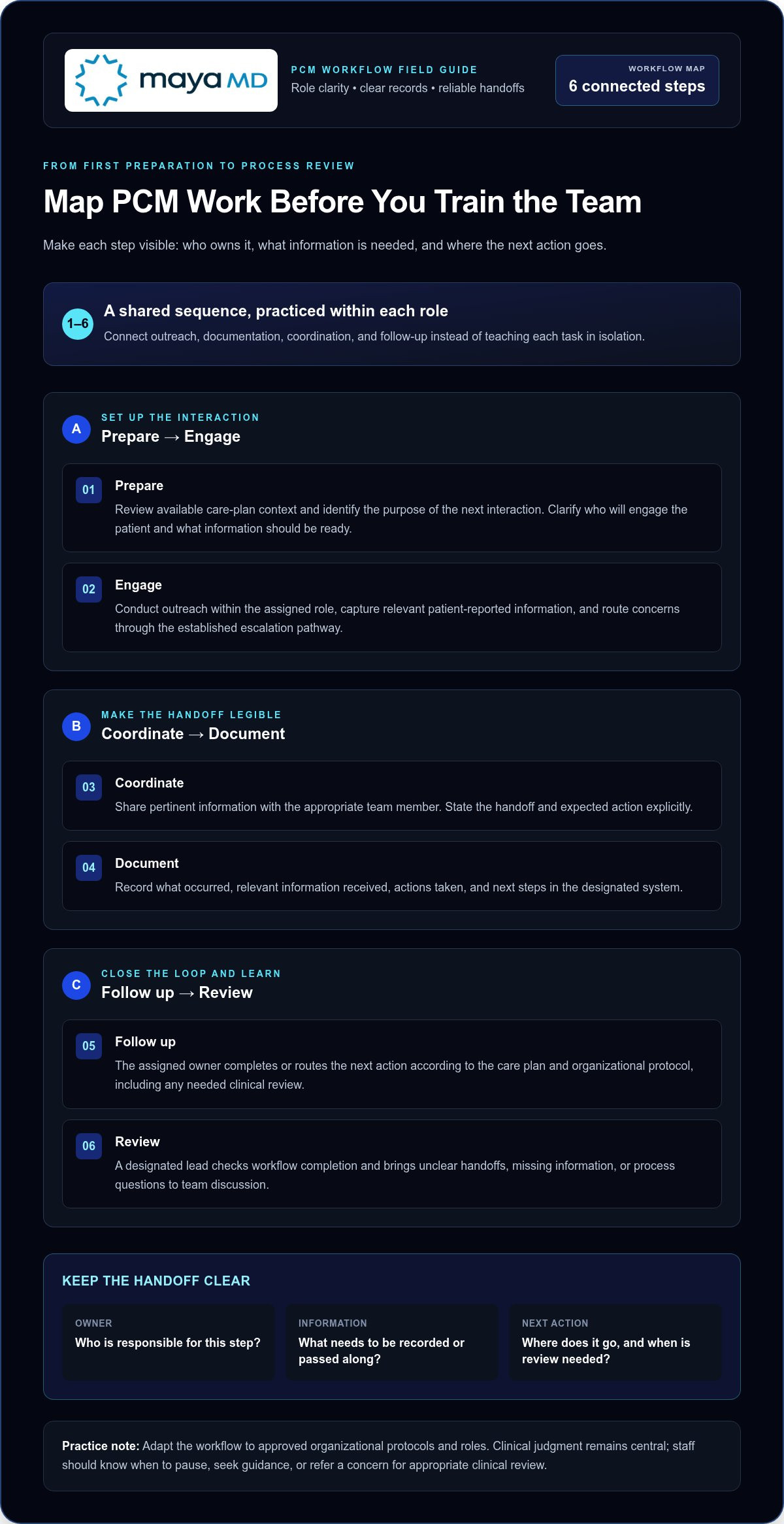
Start with the work as it should happen, not with a list of software features. A workflow map makes the sequence visible and gives each staff member a practical reference for what to do, what information to use, and where responsibility passes next. Adapt the framework to your organization’s protocols and roles; it is not a universal clinical procedure.
Prepare
The designated team member reviews the available care-plan context and identifies the purpose of the next interaction. Clarify who will engage the patient and what information should be ready.
Engage
The assigned staff member conducts outreach within their role, captures relevant patient-reported information, and routes concerns through the established escalation pathway.
Coordinate
The responsible coordinator shares pertinent information with the appropriate team member and makes the handoff and expected action explicit.
Document
The staff member completing the interaction records what occurred, relevant information received, actions taken, and next steps in the designated system.
Follow up
The assigned owner completes or routes the next action according to the care plan and organizational protocol, including any needed clinical review.
Review
A designated lead examines workflow completion and identifies unclear handoffs, missing information, or process questions for team discussion.
For example, imagine a patient with a complex chronic condition reports a new concern during routine outreach. The staff member records the patient’s report without making a clinical determination, then routes it to the appropriate reviewer under the practice’s escalation process. The receiving team member acknowledges the handoff, determines the next step within their scope, and communicates who is responsible for follow-up. The workflow map should show who owns each transition and where the outcome is recorded. Use fictional or properly de-identified scenarios for training, not identifiable patient details.
Turn the workflow map into observable staff actions
For each stage, define actions an observer can verify: confirm the right information is available, use the approved communication process, record the interaction, and route the next step to its owner. Mark decision points that require clinical review rather than asking staff to infer what to do. Rehearse routine cases and exceptions with sample scenarios so teams can practice handoffs without using patient information.
Make role boundaries and documentation expectations explicit
Distinguish administrative coordination, such as routing information or tracking an assigned follow-up, from clinical assessment and decision-making. Specify where staff record outreach, patient-reported information, actions, handoff status, and next steps. Training should direct staff to organizational policies and established escalation pathways, not replace clinical judgment with a generic map.
Before adding program-specific requirements to training materials, review current CMS and Medicare guidance alongside applicable organizational policies. Avoid outdated templates, especially those that describe documentation or role expectations. Teams exploring how digital tools fit into the workflow can also review information about MayaMD and its workflow support.
A clear map also gives teams a useful basis for discussing workflow technology and where it fits into PCM processes.
Choose Training Methods That Build PCM Competency
The best practices for training staff on PCM workflows match the learning method to the task. A concise explanation can introduce a protocol, while a realistic scenario lets staff practice applying it when information is incomplete or a handoff needs clarification. Combining methods keeps training practical: staff can review foundational material in brief modules, then use shared practice time for decisions and interactions that need discussion.
Give each approach a specific purpose. A workflow walkthrough can clarify sequence and responsibilities; peer shadowing can show how an experienced colleague handles routine coordination; coaching can address an individual skill gap. The comparison below can help leaders select a method and define evidence of learning.
| Training method | Best use | Limitation | Evidence of learning |
|---|---|---|---|
| Concise instruction | Introduce terminology, role boundaries, or a policy update. | Doesn’t show whether staff can apply the material. | Learner explains the relevant steps or expectations. |
| Workflow walkthrough | Show how tasks, documentation, and handoffs connect. | Can become passive if learners only observe. | Learner traces a workflow and identifies owners and decision points. |
| Scenario practice | Rehearse exceptions, escalation, and complex handoffs. | Requires realistic scenarios and a structured debrief. | Learner states and demonstrates an appropriate next step. |
| Peer shadowing | Observe how routine tasks are carried out in context. | Local habits may not match approved procedures. | Learner describes observed actions against the workflow standard. |
| Coaching | Address a specific performance gap through feedback and repetition. | Needs a clear competency target and follow-up. | Learner applies feedback during a later practice or review. |
Use scenarios and supervised practice for complex handoffs
Build exercises around changing patient needs, incomplete information, and decisions to route a concern for review. For instance, a fictional patient may report a new issue during outreach, while the scenario leaves out a detail needed for the next step. Ask the learner what they would do, who should receive the handoff, and why. Debrief the process, including any unclear instructions or role boundaries. The goal is to improve the workflow, not assign blame.
Supervised practice can extend the exercise into the team’s actual workflow, with appropriate oversight and approved procedures. Include digital tools that support engagement and documentation, such as a Clinical AI Agent, so staff learn to use them within defined responsibilities rather than treating technology as a substitute for judgment.
Assess competency with observable evidence
Combine role-specific checklists, scenario performance, and documentation review. Define in advance what supports independent work, when supervised repetition is needed, and which gaps call for targeted coaching. For example, a checklist might assess whether the learner captures required information, routes a concern correctly, and records the next step. Apply the same criteria across reviewers to support consistent assessment.
Training completion shows that a session was finished; workflow competency shows that a staff member can perform assigned steps reliably under the established process. MayaMD’s Clinical AI Agent supports patient engagement and clinical documentation as part of PCM workflows. The MayaMD contact page provides a way to discuss how this support can fit into your workflow.
Launch PCM Staff Training With a Practical 30-Day Plan
A structured launch can make training manageable without pulling staff away from patient-facing work for long stretches. The 30-day schedule below is an adaptable planning framework, not a required standard. Adjust it to staffing capacity, role complexity, and the practice’s approved workflows. Effective training depends on preparation, guided application, and early feedback, not a fixed calendar.
Prepare the team and learning environment
Before instruction begins, confirm the current workflow, role expectations, training materials, and escalation contacts. Use fictional or appropriately de-identified cases for discussion, and establish how learners can ask questions, access coaching, and document completion. Training records should show what was covered and what practice or assessment remains; attendance alone does not demonstrate readiness.
Use this readiness checklist to prevent avoidable delays:
• Approved workflow materials and role-specific guidance are available.
• Staff have appropriate access to the systems and tools used in practice.
• Escalation pathways and responsible contacts are clear.
• A named workflow owner can answer questions and coordinate updates.
• Practice scenarios and a method for recording training progress are prepared.
Protect care capacity by scheduling concise learning blocks around team operations. Short sessions focused on one workflow segment can be easier to absorb than a single extended orientation. Reserve shared practice time for handoffs, exceptions, and questions that benefit from team discussion.
Move from guided practice to routine workflow
Begin with observation, progress to supervised scenarios, and assign tasks independently only when role-specific readiness criteria are met. Use a brief check-in to surface confusing instructions, access problems, or recurring barriers. Resolve process issues before they become informal workarounds. Adapt the schedule below to existing team rhythms.
Days 1-5, prepare
Review and validate the workflow map, confirm ownership and escalation routes, and assemble materials and practice cases.
Days 6-10, orient by role
Explain each role’s responsibilities and provide focused instruction on relevant workflow steps and tools.
Days 11-15, rehearse
Walk through sample cases, including incomplete information and handoffs requiring escalation. Ask learners to explain their next action.
Days 16-22, observe and supervise
Let staff observe routine work, then practice assigned steps with appropriate oversight and feedback.
Days 23-26, assess readiness
Review role-specific checklist results, scenario performance, and documentation against established criteria.
Days 27-30, review and adjust
Hold an initial team check-in, identify unclear steps, and assign owners to resolve workflow or training gaps.
Include the technology staff will use in relevant practice. A Clinical AI Agent can support patient engagement and clinical documentation workflows. Training should clarify how staff use that support within their responsibilities and under clinical oversight.
For more on how MayaMD supports technology-enabled PCM workflows, see the MayaMD contact page.
Sustain PCM Workflow Quality With Feedback and Governed Technology
Training should evolve as the workflow, team, and supporting technology change. A recurring review loop helps leaders identify which instructions are working and where staff need clarification or additional practice. Combine staff feedback, direct workflow observations, and documentation quality checks. Use the findings to decide whether to refresh training, clarify a handoff, or address a process barrier. Choose review intervals that fit the practice’s operations and assign an owner to track follow-up actions.
Choose process measures that reflect the steps your team is responsible for completing. Depending on the workflow, these might include whether outreach attempts are recorded, handoffs identify an owner for the next step, or documentation captures actions and follow-up plans. Use measures to understand process performance, not to imply guaranteed clinical or financial results.
Use operational signals to decide when retraining is needed
Look for recurring handoff gaps, unclear ownership, inconsistent documentation, and workflow delays. A pattern is a signal to investigate, not automatic proof that staff need another training session. Before choosing an intervention, determine whether the cause is a knowledge gap, system access or usability issue, staffing constraint, or process design problem. For care teams navigating workforce or staffing capacity hurdles, external resources like Catalyst Behavioral Health Consulting offer specialized HR and operational guidance. Address the source where possible, then provide focused coaching or practice for any remaining skill gap.
A simple review loop can keep improvement systematic:
Collect
Gather staff observations, workflow notes, and documentation quality findings.
Interpret
Identify recurring patterns and distinguish individual learning needs from broader operational barriers.
Act
Assign an owner to update guidance, resolve a process issue, or provide targeted practice.
Recheck
Review the workflow again to determine whether the change clarified expectations.
When approved workflows or organizational policies change, update the related learning materials and tell staff what they need to do differently. Keep version ownership clear so teams are not working from conflicting instructions. These practices connect training to the process staff actually use.
Integrate clinical AI without replacing staff judgment
Governed technology can support engagement and documentation within an established workflow. MayaMD’s cloud-based, HIPAA-compliant clinical AI platform supports PCM and chronic care workflows, including patient engagement and clinical documentation through its Clinical AI Agent. Training should explain how staff use these capabilities within approved processes, what information requires review, and where questions or concerns should be routed.
Technology should support trained staff, not blur accountability. Keep clinical review, escalation, and decision-making within defined human responsibilities and organizational oversight. Include workflow technology in orientation and refresher training so staff understand its role and boundaries, and revisit those instructions when processes change.
A consistent feedback loop, clear ownership, and governed digital support can help teams maintain a shared approach as PCM workflows develop. More information about how MayaMD supports these workflows is available through the MayaMD contact page.
Make the Next Improvement Deliberate
Strong PCM training isn’t a finished project. It’s an operational capability that should adapt as team roles, patient needs, and approved workflows change. Choose one practical improvement to carry forward: clarify an unclear handoff, address a recurring learning need, or make expectations easier to apply during daily work. Assign an owner and review whether the change helps staff follow the intended process.
The best practices for training staff on PCM workflows create a foundation for ongoing refinement. Technology can contribute when it fits within defined responsibilities and clinical oversight, supporting teams without displacing their judgment. MayaMD’s clinical AI platform is designed to support chronic care workflows, including patient engagement and documentation, as part of a governed approach.
To discuss how MayaMD can support your PCM workflows, contact the MayaMD team. A deliberate next step can help your team strengthen its approach while keeping patient needs at the center.
Frequently Asked Questions
How do you train new staff on PCM workflows?
Train new staff through a role-specific onboarding pathway that pairs instruction with observed and supervised work. Explain how assigned tasks contribute to continuity for a patient with a complex condition, then ask learners to talk through an example before handling a real task. Use a documented readiness review before independent work, and identify a colleague or lead for questions during the transition. These practices help new hires connect routine actions to patient needs.
What should PCM staff training include?
PCM staff training should cover the patient-care purpose, role limits, approved communication practices, recordkeeping expectations, and how to seek guidance when a case falls outside routine procedures. Add examples of clear, neutral documentation and practice explaining a handoff to a colleague who wasn’t part of the original interaction. Include privacy and system-use expectations from organizational policy so staff know how to handle information during training and daily work.
How can a practice assess PCM staff competency?
Assess competency by reviewing a realistic work sample against role-specific criteria, rather than relying on a quiz alone. Ask the staff member to complete a sample record, explain a handoff decision, and identify when a supervisor should be involved. If multiple reviewers assess performance, calibrate them with the same rubric and discuss differences. Record strengths and gaps separately, then assign focused practice and reassess the specific skill.
How often should PCM staff receive refresher training?
Set refresher training based on workflow risk and change, rather than assuming one fixed schedule fits every practice. Revisit material when approved procedures or tools change, when staff move into a new role, or when reviews reveal a recurring gap. A planned periodic check-in can reinforce stable practices between changes. Keep refreshers brief and targeted, and document the topic and follow-up so leaders can track whether the concern was addressed.
Can AI support staff training for PCM workflows?
What should a PCM workflow training checklist cover?
A PCM workflow training checklist should make readiness verifiable for each role. Include the current workflow reference, task ownership, access to required systems, escalation contacts, documentation conventions, practice cases, and criteria for supervised versus independent work. Add a field for unresolved questions or barriers and a place to record completion and follow-up coaching. Keep the checklist version-controlled so staff can distinguish current guidance from outdated copies.




See The MayaMD Difference
Fill the form below
Download Our Apps
MayaMD for patients and MayaPro for physicians - available on iOS and Android.
FOR PATIENTS
MayaMD App
AI-powered symptom assessment, triage, and secure access to your care team.
FOR PHYSICIANS
MayaPro App
MayaPro brings patient vitals, RPM/PCM care plans, and clinical decision support to your pocket.