
How to Choose the Right RPM Devices for Your Practice

The right RPM device captures measurements your care plan can use and fits the way patients and staff will use it. Knowing how to choose the right RPM devices for your practice starts with matching each device to a clinical need, then assessing connectivity, software integration, and follow-up workflows.
Device choice affects more than what gets measured. It also determines how readings reach the care team, who responds when data is missing or concerning, and how easily patients can use the technology in daily life. These practical considerations matter as much as measurement capabilities.
Evaluate RPM devices by matching measurements to conditions and care plans, assessing software integration, assigning follow-up responsibilities, considering connectivity, and accounting for patient needs and workflows. The goal is a monitoring program in which device data supports clear, coordinated care.
Key Takeaways
• Start with the conditions and patient population your practice serves, then select devices that capture measurements relevant to a defined care plan.
• Assess whether device data can flow into your care management software and EHR in a way that supports clear, usable clinical records.
• Assign responsibility for reviewing readings, following up on missing data, and handing concerning information to the appropriate care-team member.
• Match the connection method to patients’ access, abilities, and home setup, while accounting for the support each method may require.
• Choose devices and follow-up workflows together so patients can use the system consistently and readings can inform ongoing care.
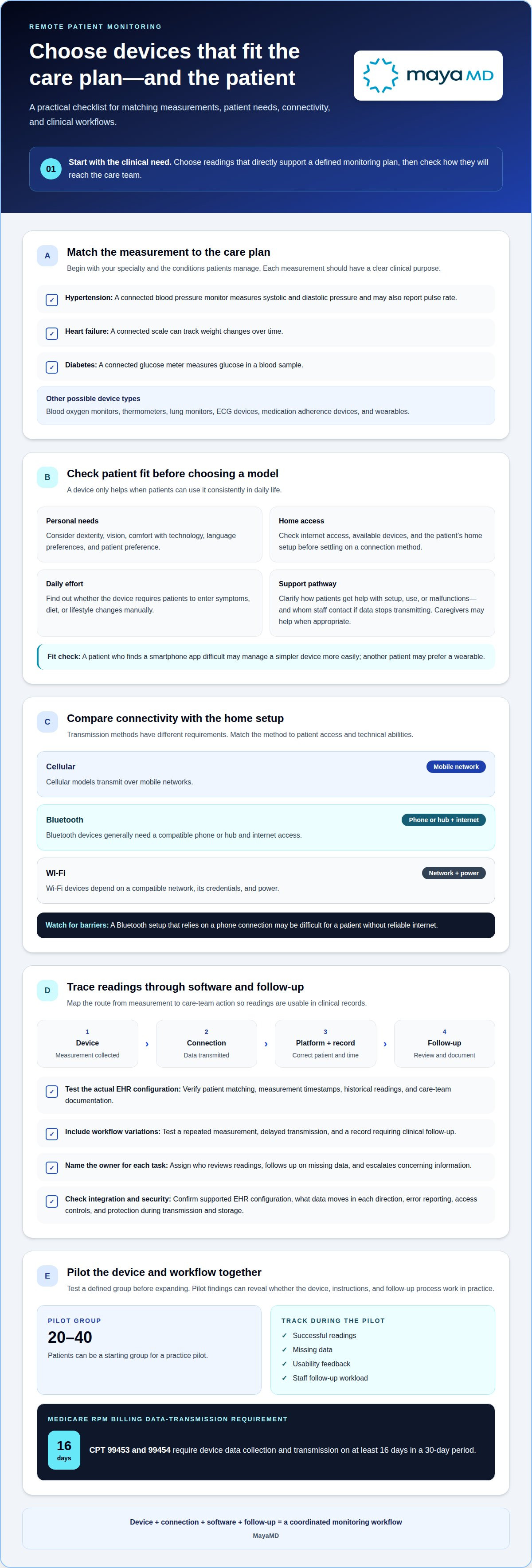
1. At a glance: What are remote patient monitoring devices?
Remote patient monitoring (RPM) uses connected devices to collect physiological readings outside a clinic, such as blood pressure, weight, blood glucose, or blood oxygen. Readings reach a platform where the care team can review trends and coordinate follow-up. Depending on the monitoring need, a program may use a blood pressure monitor, connected scale, glucometer, pulse oximeter, thermometer, lung monitor, ECG device, medication adherence device, or wearable.
Start with your specialty and the conditions your patients manage. A cardiology practice monitoring hypertension may prioritize connected blood pressure monitors, which measure systolic and diastolic pressure and may also report pulse rate. A heart failure program may use a connected scale to track weight changes over time. For diabetes care, a connected glucose meter measures glucose in a blood sample. Each measurement should directly support a clinical monitoring plan.
Assess whether patients can use the device consistently. Consider dexterity, vision, comfort with technology, language preferences, internet access, and the patient’s own preference. Someone who finds a smartphone application difficult may manage a simpler device more easily, while another patient may prefer a wearable. Depending on the device, patients may also need to enter symptoms, diet, or lifestyle changes manually. Caregivers can help with setup, regular use, and data transmission when appropriate.
Compare vendors based on the range of devices available for your practice’s common conditions and patient needs. Consider the exact model and its intended use, not just the measurement category. Ask how patients get technical help with malfunctions or usage questions, and clarify whom staff can contact when a device stops transmitting. A clear support pathway helps the care team distinguish a technical issue from a missing clinical reading.
Connectivity must work where patients use their devices. Cellular models transmit over mobile networks. Bluetooth devices generally need a compatible phone or hub and internet access. Wi-Fi devices depend on a compatible network, its credentials, and power. Match the transmission method to each population’s home access and technical abilities. For example, a patient without reliable internet may face barriers with a Bluetooth setup that relies on a phone connection.
Evaluate vendors by reviewing device suitability, patient support, data transmission, and workflow fit; then pilot devices with a defined group. A practice can begin with 20-40 patients and track successful readings, missing data, usability feedback, and staff follow-up workload. For Medicare RPM billing, CPT 99453 and 99454 require device data collection and transmission on at least 16 days in a 30-day period. Pilot findings can show whether the selected device and patient instructions support that transmission pattern.
2. Care management software and device integration
An RPM program works best when readings enter clinical workflows without avoidable manual steps. Map the path from measurement to care-team review: device, connection, monitoring platform, patient record, and follow-up documentation. For example, a glucose reading should remain linked to the correct patient and measurement time. A disconnected step can leave staff reconciling records instead of reviewing trends.
Choosing the right RPM devices for your practice also means evaluating how readings appear in your actual EHR configuration. Use a live demonstration to confirm patient matching, measurement timestamps, historical readings, and care-team documentation. Test more than a successful sample: include a repeated measurement, delayed transmission, and a record requiring clinical follow-up. These scenarios reveal how the platform handles routine workflow variations.
Integration also depends on how measurements reach the platform. Confirm that each device can synchronize data with the practice’s EHR system, and establish what happens when transmission fails. A blood pressure monitor or glucose meter may collect valid readings, but staff need to find them in the patient record. Trace a reading through every system used by the program.
Assess how devices fit clinical and billing workflows. Identify where staff review readings, document work, and record patient communication. Confirm that timestamps and historical measurements remain available rather than appearing as isolated values. Map any manual entry required for symptoms or context, and assign responsibility for completing it. Integration should clarify who acts next, not create a separate record for staff to maintain.
Data security and EHR compatibility require a review of the specific configuration. Examine how the platform authenticates users, controls access, protects information during transmission and storage, and records system activity. Match those controls to your organization’s security policies. Confirm which EHR instance and configuration the integration supports, what data moves in each direction, and how errors are reported. A demonstration using another configuration may not reflect your workflow.
A practical way to decide how to choose the right RPM devices for your practice is to trace a reading from collection through documentation. RPM device and platform costs depend on the case and are provided after a quote request; device mix, setup, integration scope, connectivity, and ongoing support affect the estimate. Define the required devices and workflows, then discuss your RPM integration needs.
3. Assigning RPM data follow-up to staff or the vendor
RPM follow-up starts with a named owner for each task. Decide who monitors incoming readings, contacts patients about missing data, and escalates concerning results to a clinician. The owner may be practice staff or an outside vendor, but the clinical handoff must be clear. Document each assigned role so a missed transmission cannot go unnoticed between teams.
Regular communication supports consistent data transmission. Patients may need reminders, help using a device, or troubleshooting when readings stop. A vendor may assist with patient outreach, tutorials, orders, or administrative tasks. Alternatively, the practice can manage those contacts directly, giving staff a role in building patient relationships. Choose the approach that fits your team’s capacity and the way your practice engages its population.
Distinguish missing data from a technical failure. A Bluetooth monitor may collect a reading but fail to transmit it if pairing is lost, permissions change, or the receiving phone goes offline. A cellular device may encounter weak coverage, depleted batteries, or service configuration issues. Assign a first response to each situation, such as patient instructions for reconnecting or escalation to technical support.
Specify how physiological data moves from collection to clinical review. Cellular RPM devices can transmit data in real time, allowing providers to receive immediate notifications of concerning health changes. That transmission does not replace a clinical response plan. Set condition-specific alert thresholds, identify who reviews alerts, and define how urgent findings reach the clinician managing the patient.
Patient instructions should explain what the device collects, how readings are transmitted, and what to do if a reading falls outside the range set for their condition. For example, an alert may tell a patient to contact their provider. Clarify that process during onboarding, including how patients report symptoms or device problems. Caregivers may also help patients use devices and respond to unusual readings.
Set out responsibilities in the RPM agreement and staff procedures. Specify vendor availability, patient communication, outreach about missing readings, technical support, and the clinical responsibilities retained by the practice. Include the alert handoff method and where follow-up is documented. For post-discharge programs, automated communication can help patients receive relevant follow-up messages after leaving care. The practice still needs an explicit process for clinical escalation and review.
Before launch, test the workflow with examples: a reading arrives as expected, a patient misses transmissions, and an alert requires provider follow-up. Confirm who acts, how the action is recorded, and how the patient receives instructions. These scenarios reveal gaps between connectivity, communication, and clinical responsibility before they affect routine monitoring.
4. Cellular, Bluetooth, and hub-based device connectivity
Connectivity determines whether readings collected at home reach the monitoring software. Assess the complete transmission path where each patient uses the device, not just in the clinic. A cellular monitor sends patient data over mobile networks. A Bluetooth monitor sends readings through a compatible phone or hub, which needs internet access to transmit them. A hub-based setup can connect a Bluetooth device to a separate cellular hub.
Cellular devices reduce reliance on a patient’s smartphone or home internet connection. Some are ready to use out of the box, although patients may still need to insert batteries and turn them on. Weak coverage, activation problems, incorrect service configuration, depleted batteries, or power loss can interrupt transmission. For patients with reliable mobile coverage but limited internet access, cellular may be a better fit.
Bluetooth can suit patients who already use a compatible phone or tablet and can manage pairing. The device must pair with the receiving phone or hub, and required permissions must remain enabled. Lost pairing, range problems, application changes, or an offline phone can stop readings from reaching the care team. A patient who changes phones may also need help reconnecting the device and software.
A separate hub can reduce reliance on a patient’s personal phone, but adds another connection point. The Bluetooth sensor must communicate with the hub, which must then transmit data through its network connection. If the sensor is out of range or the hub is offline, readings may not arrive. Include both devices in patient instructions and technical troubleshooting workflows.
Wi-Fi devices require a compatible wireless network, network credentials, and power. A changed password, replaced router, weak signal, internet interruption, or power loss can disrupt transmission. Before choosing this model for a chronic care population, consider whether patients can maintain their home network and reconnect the device when settings change. Test transmission where the patient will take readings.
Compare options against the care plan and the patient’s actual environment. During onboarding, explain what readings the device collects, how they reach the practice, and what to do if transmission stops. Confirm receipt of the first patient data and establish who follows up on gaps. Reliable connectivity supports the review of readings and related clinical workflows. It can also affect whether a patient’s transmissions meet applicable reimbursement criteria, so track missing data rather than assuming collection succeeded.
5. Matching devices to conditions and care plans
Choose measurements because they answer a defined clinical question, not simply because a device can collect them. For each patient group, identify the condition being monitored, the measurement needed, and how clinicians will use its trend. A blood pressure monitor can support a hypertension plan when readings inform ongoing review. A diabetes plan may use glucose readings to guide clinical follow-up.
Connect each device to a specific action in the care plan. If a reading changes, who reviews it, what context matters, and how does the patient receive follow-up? Blood pressure readings, for example, become more useful when the team can interpret changes over time and relate them to the patient’s care goals. Data without an identified use can add work without strengthening monitoring.
Build the RPM program around the population’s clinical needs. A practice supporting patients with one chronic condition may define a focused measurement plan. Patients with multiple conditions may need a coordinated approach that avoids disconnected monitoring tasks. Tie each measurement to a clinical purpose, and define how the care team will respond when readings or reported symptoms need review.
Patient engagement is part of device fit. Consider whether a patient can operate the device, take readings as directed, and understand how to report symptoms. A plan that depends on frequent manual entries may not suit someone who has difficulty using a phone or entering information. Adapt education and communication so patients understand why each measurement matters and how it supports their goals.
Clinical context also shapes the measurement schedule and follow-up plan. Identify when readings should be collected, how the team reviews trends, and what happens after a missed transmission. Avoid treating one isolated value as a complete picture. Ongoing monitoring is most useful when the care team understands the patient’s baseline, the plan’s objectives, and the next action for each type of result.
CMS allows RPM when it is medically necessary for acute or chronic conditions. This makes clinical purpose central: select devices and measurements that support the patient’s condition and documented care plan. The appropriate device is not necessarily the one with the broadest feature set. It is the one whose data can inform a defined care decision and fit the patient’s ability to participate.
Before launch, map each condition to its measurement, review owner, patient instructions, and follow-up action. Use that map to identify redundant readings or steps that do not advance the plan. If your practice is developing coordinated monitoring and engagement workflows, discuss your RPM care-plan needs.
MayaMD
MayaMD supports practices connecting remote patient monitoring with coordinated chronic care. Its platform facilitates RPM and Principal Care Management, while AI patient engagement solutions can support communication throughout care plans. Automated post-discharge communication solutions can also help maintain continuity as patients transition home.
Consider MayaMD when your practice is aligning monitoring technology with patient engagement, care-team workflows, or follow-up after discharge. The right device still depends on the condition, patient needs, and clinical plan; coordinated digital support can help connect those decisions to ongoing care. Explore remote patient monitoring for chronic care or contact MayaMD to discuss your practice’s needs.
Turn device selection into a care strategy
Treat RPM as an evolving care strategy, not a one-time equipment decision. As your practice learns how patients use devices and how readings inform care, refine the connection between clinical goals, patient engagement, and team workflows. Knowing how to choose the right RPM devices for your practice means keeping those goals aligned as the program develops.
MayaMD’s Clinical AI Agent, AI patient engagement solutions, and automated post-discharge communication solutions can support connected patient care alongside your RPM planning. The right combination depends on your practice’s priorities and how you want digital support to fit into care delivery.
Contact MayaMD to discuss RPM and explore how digital support could align with your practice’s care plans. A thoughtful next step can help you build a monitoring approach that works for both patients and the people caring for them.
Frequently Asked Questions
At a glance: What are remote patient monitoring devices?
RPM devices collect physiological information while patients are away from a healthcare facility. Depending on the care plan, readings may include blood pressure, weight, blood glucose, oxygen saturation, or heart rhythm. Their clinical value comes from connecting measurements over time with care-team review and follow-up. For example, a series of home blood pressure readings can provide context beyond a single office measurement.
Are RPM Services Covered by Medicare or Insurance?
Medicare and other insurers may cover RPM under applicable requirements, but coverage depends on insurance status and plan type. As of 2026, Medicare uses six RPM CPT codes for setup, device supply, and clinical management. CPT 99453 and 99454 require data collection and transmission on at least 16 days in a 30-day period. CPT 99457 and 99458 are calendar-month services requiring interactive communication.
Do RPM devices need to be FDA approved?
For Medicare RPM, devices must meet the medical-device definition in section 201(h) of the Federal Food, Drug, and Cosmetic Act. That definition is not, by itself, a blanket statement that every device needs a particular FDA clearance or approval. Evaluate the exact model and intended use for the measurements in your program, such as blood pressure monitoring for hypertension or glucose measurement for diabetes.
How do RPM devices send readings to the care team?
Devices transmit measurements through cellular service, Bluetooth paired with a phone or hub, or Wi-Fi. The receiving connection sends readings to the monitoring platform, where they can be associated with a patient record for review. For example, a Bluetooth blood pressure monitor may depend on a paired phone and internet access. The transmission route matters because a connection failure can interrupt incoming data without indicating a change in the patient’s condition.
How much revenue can a practice expect from an RPM program?
While average monthly reimbursements for codes like CPT 99453, 99454, and 99457 often range between $100 and $120 per active patient, this figure describes potential program revenue rather than a guaranteed financial return. Revenue depends on patient engagement, applicable coverage, data transmission, and the clinical management work performed. A practice utilizing tools from MayaMD should model its expected program using its patient population, staffing workflow, and payer mix rather than applying one estimate to every enrollee.
What types of remote patient monitoring devices qualify for reimbursement in the United States?
Reimbursement depends on the device meeting applicable medical-device requirements and the service meeting payer rules, not simply on the device category. RPM programs may monitor physiological measures using blood pressure monitors, scales, glucose meters, pulse oximeters, or ECG devices. For Medicare device-supply codes 99453 and 99454, data must be collected and transmitted on at least 16 days in a 30-day period. Device choice alone does not establish coverage.
Which RPM devices are FDA-cleared and clinically validated for common chronic conditions?
Clearance and clinical validation apply to a specific device model and intended use, so a broad category name alone establishes neither. For hypertension, evaluate the exact blood pressure monitor and its intended measurement use. For diabetes, assess the glucose meter model used to collect readings. Distinguish evidence for the device itself from evidence for the larger RPM program or its care workflow.
How do RPM device accuracy, connectivity, ease of use, and patient adherence compare?
Compare each model against the same clinical use and patient needs. Accuracy concerns whether it measures the intended physiological value; connectivity concerns whether readings reach the care team from the patient’s setting. Ease of use includes setup and the steps needed to take and transmit a reading. Adherence is reflected in whether patients use the device and send data consistently. Patient feedback and observed workflow gaps help reveal trade-offs.




See The MayaMD Difference
Fill the form below
Download Our Apps
MayaMD for patients and MayaPro for physicians - available on iOS and Android.
FOR PATIENTS
MayaMD App
AI-powered symptom assessment, triage, and secure access to your care team.

FOR PHYSICIANS
MayaPro App
MayaPro brings patient vitals, RPM/PCM care plans, and clinical decision support to your pocket.