
Principal Care Management Software Vendors: 2026 Guide

The vendor with the longest feature list may not be the one that best supports your care team. When comparing principal care management software vendors, ask whether a platform can support clinical workflows, patient engagement, and oversight without adding operational complexity.
Comparing options can be difficult because vendor descriptions often blur PCM, CCM, and RPM, even though these programs serve different purposes. Leaders also need to understand how documentation, staffing, and existing systems fit together, and how AI can support care within appropriate clinical oversight.
This 2026 comparison guide offers practical criteria for evaluating vendors on those priorities. It covers workflow continuity, clinical documentation, patient engagement, oversight, integration considerations, and organizational fit, with questions to help define AI’s role. MayaMD’s cloud-based platform supports PCM, APCM, and RPM for chronic care, with a Clinical AI Agent designed to support patient engagement and clinical documentation. Use the guide to compare vendors against the realities of ongoing care, rather than counting features alone.
Key Takeaways
• PCM, CCM, and RPM serve different care-management purposes. Compare software against the specific program and patient needs your organization supports.
• Assess patient engagement, documentation, care coordination, and clinician oversight as distinct parts of your workflow.
• Use consistent criteria to compare principal care management software vendors, focusing on documented capabilities and how they fit your process.
• Map current processes and involve clinical, operational, privacy, and technology stakeholders before planning implementation.
• MayaMD supports PCM, APCM, and RPM for chronic care, with a Clinical AI Agent designed to support patient engagement and clinical documentation.
What Principal Care Management Software Vendors Need to Support
Principal Care Management (PCM) software helps a care team coordinate and document ongoing care for a patient with a complex chronic condition. It should support the practice’s defined clinical process, from organizing patient information to enabling appropriate follow-up and clinician oversight. Software can make work more visible and consistent, but it doesn’t replace clinical judgment or determine whether a patient qualifies for a particular program.
For practices comparing principal care management software vendors, start by distinguishing the care model from the technology used to support it. A platform may include several care-management functions, but adjacent capabilities don’t make programs interchangeable. Evaluate each tool against the patient population, responsibilities, and workflow it is meant to support.
How PCM differs from CCM and RPM
PCM focuses on care management for a patient with a complex chronic condition. CCM, or Chronic Care Management, supports broader ongoing management of chronic conditions; its scope and application depend on the patient and program requirements. Don’t assume that a general CCM workflow automatically meets your organization’s PCM needs.
RPM, or Remote Patient Monitoring, uses remotely collected patient health data as part of care. Monitoring can provide information for a team to review, but it doesn’t replace care coordination, documentation, or clinical oversight. A platform that supports PCM, CCM, and RPM may offer tools for multiple workflows, but assess each separately. For adjacent models such as advanced primary care management, define the program requirements before deciding which software capabilities matter.
Why vendor categories can obscure the actual offering
Labels such as “care management platform” or “AI-enabled EHR” are starting points, not proof of workflow fit. Separate software functions from clinical services, staffing, or billing support. A feature may organize information or support communication without providing the clinical personnel or services needed to deliver care.
Different tools address different steps. An EHR may support access to clinical records and documentation; an AI feature may assist with engagement or documentation; monitoring technology may collect patient data. These functions can work together, but one capability doesn’t ensure the others are present or connected to your process. A monitoring feed, for example, doesn’t define who reviews relevant information or how follow-up is documented.
Look for descriptions tied to observable tasks rather than broad claims. Can the vendor show how the software supports patient outreach, records care activity, and incorporates clinician review into the workflow? Which capabilities are demonstrated in product materials, and which are described only in general terms? Answers to these questions help distinguish specific functions from marketing language.
The practical test is continuity: can the technology support the handoffs and documentation your team needs while preserving appropriate clinical oversight? Define that workflow before comparing feature lists. You’ll then have a consistent basis for evaluating software, related services, and technical tools without mistaking a program label for operational fit.
Which PCM Software Capabilities Matter Across the Care Workflow?
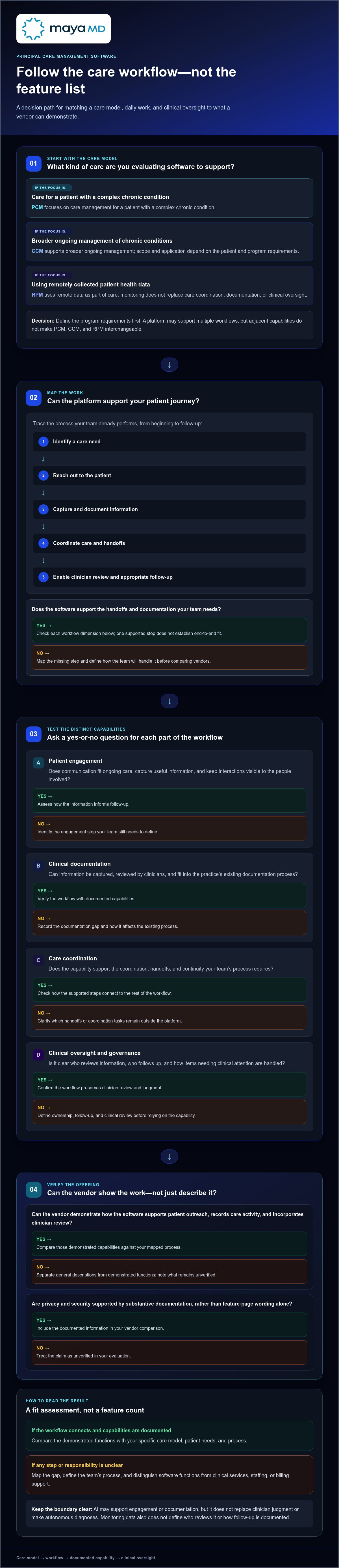
Start with the work your team already performs. Trace the patient journey from identifying a care need through outreach, documentation, coordination, and clinician review. Then assess whether each software capability supports a specific step. Don’t assume that a broad “care management” label covers the full workflow.
For practices comparing principal care management software vendors, keep four dimensions distinct: patient engagement, documentation support, care coordination, and clinical oversight. A platform may address one area without covering the others. Mapping capabilities to actual tasks shows where software can support continuity and where staff still need a defined process.
Patient engagement and clinical documentation
Assess patient engagement in the context of ongoing care, not just initial enrollment or a single message. Identify when your team communicates with patients, what information is useful to capture, and how that information informs follow-up. A communication feature is most useful when it fits the team’s process and keeps interactions visible to the people involved in care.
Review documentation support at the workflow level, too. Consider how information is captured, whether clinicians can review it, and how it fits the practice’s existing documentation process. MayaMD’s Clinical AI Agent supports patient engagement and clinical documentation as part of its chronic-care platform. Its Principal Care Management overview describes this support alongside PCM, APCM, and RPM for chronic conditions.
Governance, privacy, and clinical oversight
Technology should support a governed clinical process. Define who reviews information, who is responsible for follow-up, and how the team handles an item that needs clinical attention. AI can support engagement or documentation, but it shouldn’t be presented as replacing clinician judgment or making autonomous diagnoses. Human review remains central to the practice’s process.
Assess privacy and security through substantive documentation, not feature-page wording alone. Review the vendor’s stated HIPAA-related framework and materials describing data handling. Areas to examine include access controls, auditability, data retention, and safeguards for information moving between systems. Treat these as evaluation criteria rather than assumptions based on a general compliance claim. MayaMD describes its cloud-based platform as HIPAA-compliant; review how its materials fit your organization’s governance and technology processes.
Test each capability against a realistic workflow scenario. Trace how a patient communication becomes available for documentation and clinician review, then identify where responsibility passes between team members. This can expose process gaps before adoption. MayaMD’s care-management workflow discussion can help you consider how these capabilities relate to your PCM approach.
How Principal Care Management Software Vendors Compare
A useful comparison applies the same criteria to every vendor and separates specific product capabilities from general claims. The table below provides a framework for comparing MayaMD, HealthSnap, Medsien, and MedCare MSO. Use each row to record what the vendor describes for your evaluation, then assess how those capabilities map to your workflows.
What to compare across vendors
MayaMD’s stated scope includes PCM, APCM, and RPM support for chronic conditions. Its Clinical AI Agent supports patient engagement and clinical documentation, and the cloud-based platform is described as HIPAA-compliant. For every vendor, including HealthSnap, Medsien, and MedCare MSO, compare the PCM workflow, engagement functions, and governance details against the same requirements.
| Vendor | Scope to assess | PCM workflow | Patient engagement | Governance |
|---|---|---|---|---|
| MayaMD | Cloud-based clinical AI platform supporting PCM, APCM, and RPM for chronic conditions. | PCM support is stated. | Clinical AI Agent supports patient engagement and documentation. | Platform is described as HIPAA-compliant; review privacy and security materials as part of your evaluation. |
| HealthSnap | Compare the vendor’s stated scope with your program and workflow requirements. | Assess how the described workflow supports your PCM process. | Review engagement functions against your communication needs. | Review privacy, security, and oversight information. |
| Medsien | Compare the vendor’s stated scope with your program and workflow requirements. | Assess how the described workflow supports your PCM process. | Review engagement functions against your communication needs. | Review privacy, security, and oversight information. |
| MedCare MSO | Compare the vendor’s stated scope with your program and workflow requirements. | Assess how the described workflow supports your PCM process. | Review engagement functions against your communication needs. | Review privacy, security, and oversight information. |
How to make the comparison fair and useful
Use the same practice scenarios for each vendor. For example, trace a patient interaction from outreach through documentation and clinician review. Record which steps the product supports, which depend on practice processes, and which need further discussion. This keeps the comparison anchored in your workflow rather than broad category labels.
For principal care management software vendors, use a consistent evidence record for each capability: what the vendor specifically describes, how it applies to your PCM workflow, and what your team needs to clarify. Apply this approach to engagement, clinical documentation, care coordination, privacy, and oversight. Avoid treating a general product description as evidence that a capability meets a particular operational need.
Avoid unsupported scores, rankings, outcome comparisons, or reimbursement claims. Instead, note how each described capability aligns with your requirements and where your evaluation needs more detail. This creates a transparent shortlist and focuses further assessment on the workflows and governance needs that matter most.
How to Evaluate and Implement PCM Software in a Practice
Begin with the practice’s care process, not a vendor demonstration. A structured evaluation helps clinical, operational, privacy, and technology teams determine whether software can support the work they need and what must change before adoption. Apply the same requirements to each principal care management software vendor, then assign owners for implementation and ongoing review.
Map the workflow before assessing vendor fit
Document the current process from patient identification through communication, clinical review, documentation, and follow-up. Make handoffs visible: who receives information, who decides what action is needed, and where is that action recorded? Note steps that rely on duplicate entry, unclear ownership, or workarounds. These observations form practical requirements for evaluating software.
Use this sequence to structure the work:
Map needs
Define the patient-care and operational requirements the software is expected to support.
Define workflows
Specify responsibilities, review points, communication steps, and documentation practices.
Assess technical fit
Compare system requirements and interoperability claims with the practice’s environment.
Plan adoption
Identify training needs, clinical oversight, and the people responsible for rollout.
Review performance
Evaluate how the process is working and adjust it based on observed workflow needs.
Bring the right perspectives into these decisions. Clinicians can define review and follow-up expectations; operational leaders can assess workload and handoffs; privacy and compliance stakeholders can review data governance; and technology teams can examine system requirements and information exchange. Include the staff who will use the workflow day to day. Their input can expose friction that a high-level process map misses.
Plan integration, adoption, and ongoing review
Assess technical fit in the context of the practice’s systems. Document which information needs to move between tools, where staff will access it, and how records will be maintained. Evaluate interoperability claims against your actual environment rather than assuming they confirm a specific integration. Identify technical dependencies and ownership before setting an implementation plan.
Plan adoption as deliberately as configuration. Define role-based training, clarify when clinician review is required, and establish a staged operational review so teams can identify issues before expanding use. Choose process measures tied to your goals, such as completion of planned documentation, clarity of task ownership, or whether follow-up steps are recorded. These measures assess workflow, not guaranteed clinical outcomes. Set a regular review cadence and assign responsibility for acting on findings.
Keep regulatory and financial assumptions current. Before configuring processes around eligibility, documentation, or reimbursement, consult authoritative CMS guidance and involve the appropriate compliance and billing stakeholders. Requirements can change, so verify current guidance rather than relying on vendor summaries alone.
Explore how MayaMD’s platform relates to your PCM workflow.
Where MayaMD Fits Among Principal Care Management Software Vendors
MayaMD supports PCM, APCM, and remote patient monitoring for chronic conditions. These capabilities bring adjacent care-management models into one platform context, but the models remain distinct. For an organization comparing principal care management software vendors, consider how each capability relates to your patient population, responsibilities, and clinical workflows.
A connected approach to chronic-care support
PCM support sits alongside MayaMD’s APCM and RPM capabilities. Each addresses a different care-management context, so define the program and workflow you are evaluating rather than treating the terms as interchangeable. RPM can contribute remote patient information to chronic-care processes, while care management involves its own coordination and clinical review. A broader platform scope may suit organizations working across models, provided each workflow is assessed against its own requirements.
Continuity also depends on what happens around each care interaction. MayaMD’s Clinical AI Agent supports patient engagement and clinical documentation, helping teams maintain visibility across ongoing communication and recorded information. The agent supports the workflow; it doesn’t replace clinician judgment or make care decisions autonomously. The Clinical AI Agent overview can help frame how these functions relate to your documentation and engagement processes.
APCM is a distinct model, not another name for PCM. Practices evaluating both should compare the responsibilities and processes associated with each rather than assuming one capability automatically meets the needs of the other. This distinction helps keep software selection aligned with the care model the organization intends to support.
Questions to take into a MayaMD conversation
A focused discussion can translate product scope into operational fit. Bring a representative workflow and identify where patient engagement, documentation, and clinician oversight need support. Consider questions such as:
• How could the platform’s PCM support relate to our current care coordination and follow-up process?
• How might patient engagement and clinical documentation support fit the way our team communicates and records care?
• Where does clinician review remain part of the workflow, and how should responsibilities be defined?
• Which privacy, technical, and operational requirements should shape our evaluation?
These questions help your organization explore fit without presuming a particular clinical result, reimbursement outcome, or implementation timeline. Consider the answers alongside internal requirements and current governance processes. They also provide a practical basis for identifying the workflow or technical details your team needs to assess.
MayaMD supports PCM, APCM, and RPM, with a Clinical AI Agent designed to support patient engagement and clinical documentation. These capabilities provide a concrete starting point for comparing how a platform fits your organization’s requirements.
Make Your Next Decision a Workflow Decision
The strongest software decision isn’t necessarily the one that checks the most boxes. It’s the one your organization can explain, govern, and adapt as patient needs and care processes evolve. Before moving forward, create a concise decision record: identify the needs that matter most, note where your evaluation supports a good fit or needs more detail, and assign responsibility for reviewing the decision over time.
This gives clinical and operational leaders a shared basis for assessing principal care management software vendors beyond the initial selection. It also keeps future adjustments grounded in experience rather than assumptions, helping teams protect continuity while refining how care is coordinated.
MayaMD’s platform supports chronic-care workflows through clinically governed technology. Contact MayaMD to discuss your principal care management needs.
Frequently Asked Questions
What does principal care management software do?
Principal care management software helps a practice organize work related to ongoing care for a patient with a complex chronic condition. A team might use it to keep outreach, clinical notes, and follow-up tasks visible within a process. Functions vary by platform. During evaluation, identify which tasks the software supports and which remain part of your organization’s clinical services, staffing, or billing operations.
How is PCM software different from CCM software?
PCM generally centers on care management for a complex chronic condition, while CCM refers to chronic care management more broadly. The distinction matters when a practice’s patients and care responsibilities call for a specific workflow. A CCM tool may support useful tasks without covering every process your team needs for PCM. Compare its documented functions with your practice’s requirements and current CMS guidance.
What should I compare when choosing a PCM software vendor?
Compare each vendor’s documented PCM functions, patient engagement, documentation processes, clinical oversight, privacy information, interoperability, and implementation approach. Apply the same real-world scenario to each option, such as tracing how a patient interaction is recorded and made available for appropriate review. A consistent evidence record helps distinguish demonstrated capabilities from claims that need further discussion.
Can AI support principal care management workflows?
Yes. AI can support tasks such as patient engagement or clinical documentation when those functions are part of a platform. Define its role within your organization’s process: determine what information it helps handle, who reviews relevant output, and how concerns are escalated. Don’t assume an AI feature diagnoses a condition or independently directs care. Assess its stated purpose, privacy safeguards, and clinical governance before use.
Is PCM software the same as remote patient monitoring software?
No. PCM software is oriented toward care-management workflows, while remote patient monitoring involves remotely collected patient information and related review processes. For example, when a practice receives remote readings, the monitoring function concerns those data, while care management also involves how the team coordinates and documents ongoing care. If a platform includes both, identify the separate functions and define how information moves between them.
Is principal care management software HIPAA compliant?
That depends on the vendor, services used, and organizational configuration. Review current privacy and security documentation with your privacy, security, and compliance stakeholders. Assess how protected health information is handled, who can access it, how access is monitored, and what contractual responsibilities apply. A general product description or the presence of AI doesn’t establish that a particular deployment meets your organization’s requirements.




See The MayaMD Difference
Fill the form below
Download Our Apps
MayaMD for patients and MayaPro for physicians - available on iOS and Android.
FOR PATIENTS
MayaMD App
AI-powered symptom assessment, triage, and secure access to your care team.
FOR PHYSICIANS
MayaPro App
MayaPro brings patient vitals, RPM/PCM care plans, and clinical decision support to your pocket.