
Integrating RPM Data with EHR Systems: 2026 Guide

What if the most important part of integrating RPM data with EHR systems isn’t moving readings, but deciding what happens after they arrive? A blood pressure or glucose value that lands in the chart without a clear review process can add noise rather than support care. When teams rely on separate dashboards or duplicate documentation, useful patient information can remain disconnected from the longitudinal record.
Organizations bringing remote patient monitoring into EHR workflows need to do more than establish a technical connection. Data should be presented in a clinically useful way, with clear alert thresholds, review ownership, escalation steps, and privacy responsibilities.
This guide compares common RPM-to-EHR data exchange approaches and explains how to assess workflow fit, interoperability, and governance before implementation. You’ll also learn how to make incoming readings actionable without overwhelming clinicians or patients. MayaMD’s RPM and Clinical AI capabilities support chronic care and patient engagement workflows within a broader continuity-of-care strategy.
Key Takeaways
• Successful integration means more than transferring readings: define how data is validated, displayed, and reviewed in clinical workflows.
• When integrating RPM data with EHR systems, distinguish the exchange method from data mapping and the workflow clinicians use to act on information.
• Compare interface, vendor-managed, and file-based approaches against your needs for timeliness, control, ownership, scalability, and maintenance.
• Use a phased implementation plan, with clear responsibilities, testing, and a limited pilot before expanding to more patients or care teams.
• RPM, chronic care management, patient engagement, and clinical documentation capabilities can support continuity of care alongside an organization’s EHR.
Why integrating RPM data with EHR systems matters for connected care
Remote patient monitoring (RPM) can generate a steady stream of information outside the clinic. But collecting readings, transferring them, and enabling a clinician to act on them are distinct steps. A device may capture a measurement without sending it anywhere; an RPM platform may transmit it without placing it in the right patient’s record; and an EHR may display it without defining who reviews it or what follow-up is appropriate.
Connected monitoring collects health information remotely; clinically integrated RPM makes relevant, contextualized information available within a governed clinical workflow. This distinction matters because an Electronic Health Record (EHR) supports a longitudinal view of care, not simply a destination for incoming values. Integrating RPM data with EHR systems should address both how information moves and how it becomes usable in clinical practice.
When monitoring information sits in a separate dashboard, staff may need to switch systems or manually re-enter details. That separation can make it harder to compare a new reading with prior observations, coordinate follow-up across care team members, or see whether a patient’s report has already been addressed. A connected record can make relevant information easier to review alongside other clinical context, provided the data is presented clearly and responsibilities are established.
What information can remote patient monitoring produce?
The measures depend on the patient population, device type, and goals of the care program. Common examples include blood pressure, glucose, and weight readings, along with patient-reported symptoms. A value alone may not explain what was happening when it was recorded, so useful information can also include its timestamp and relevant notes supplied by the patient.
Context helps distinguish a single observation from a pattern that may warrant attention. For example, a weight entry paired with its timestamp and a patient’s note gives the care team more context than an isolated number. This information does not determine the clinical response; it supports an informed assessment by the responsible care team.
What changes when RPM information is visible in the EHR?
Visibility can support longitudinal review by bringing monitoring information closer to the record clinicians already use to understand a patient’s care. The benefit depends on presentation: readings need to be associated with the correct patient, identified by measure and time, and understandable within the workflow. Poorly organized or repetitive entries can add noise instead of clarity.
Integration alone doesn’t ensure that anyone reviews a reading, intervenes, or improves an outcome. Programs still need defined review ownership, escalation criteria, and follow-up procedures. In a broader remote patient monitoring program, technology supports an ongoing care model rather than replacing clinical judgment. A useful design question is simple: after information appears, who is expected to do what next?
How RPM data moves into EHR systems: interfaces, meaning, and workflow
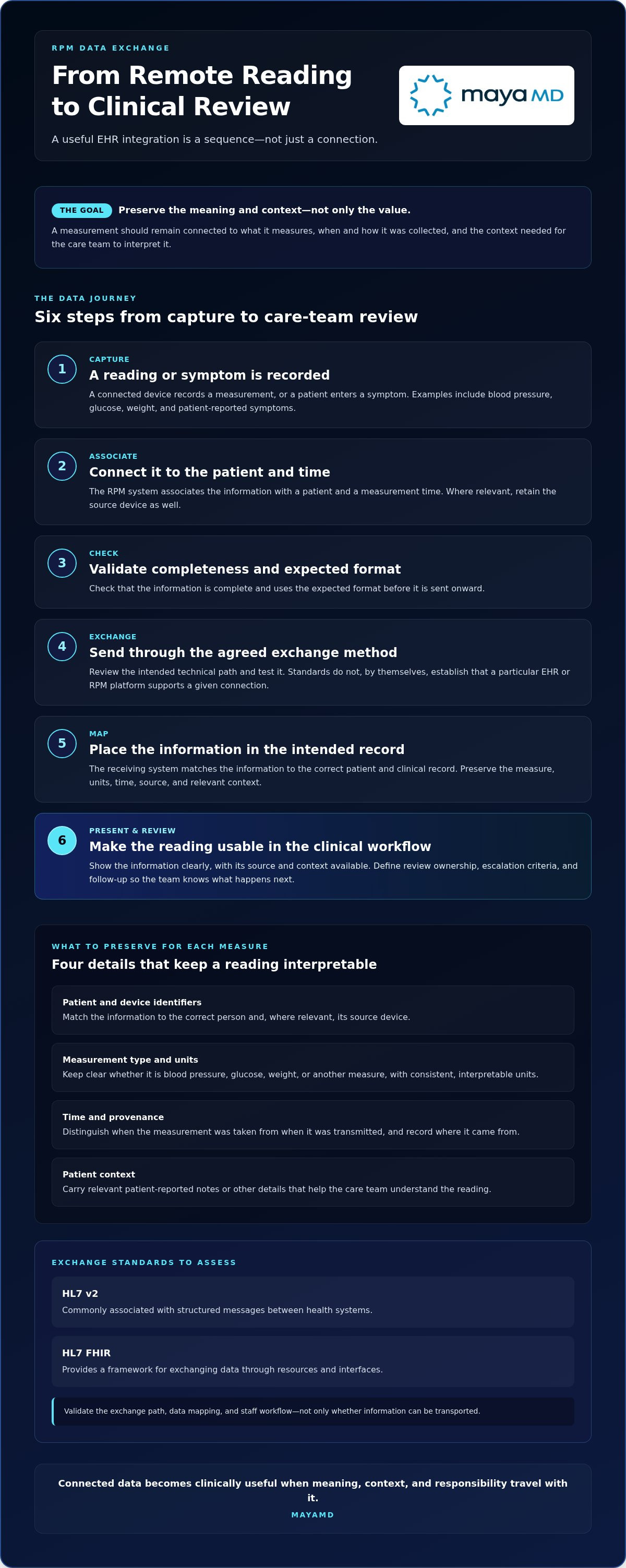
A useful integration is a sequence, not a single connection. A patient enters a symptom or a connected device records a measurement. The RPM system associates it with a patient and a measurement time, checks the data for completeness and expected format, then sends it through an agreed exchange method. The receiving system maps the information to the intended patient and clinical record, presents it for review, and makes its source and context available to the care team.
A successful transfer preserves not only the reading, but also what it measures, when and how it was collected, and the context needed to interpret it. Without those details, a number can arrive intact yet become ambiguous or misleading in the receiving workflow.
Which integration standards and data elements should teams assess?
HL7 v2 and HL7 FHIR are different approaches to exchanging healthcare information. HL7 v2 is commonly associated with structured messages between health systems; FHIR provides a framework for exchanging data through resources and interfaces. These standards should be assessed against the organization’s requirements. Their use does not by itself establish that a particular EHR or RPM platform supports a given connection. Review technical documentation and test the intended exchange path.
For each measure, define how the exchange handles:
Patient and device identifiers
Confirm that information is matched to the correct person and, where relevant, the source device.
Measurement type and units
Preserve whether a value is blood pressure, glucose, weight, or another measure, and retain units in a consistent, interpretable form.
Time and provenance
Distinguish when the measurement was taken from when it was transmitted, and record where it came from.
Context
Carry relevant patient-reported notes or other details needed to understand the reading.
Transport is only one layer. A message or API can move data, a format defines how fields are organized, terminology mapping aligns the meaning of those fields, and application workflow determines how staff encounter them. Teams integrating RPM data with EHR systems should validate all four layers, including how missing, duplicated, or out-of-range values are handled.
How should RPM readings appear in clinical workflows?
Presentation should match clinical purpose. Discrete observations can make individual readings identifiable and reviewable; flowsheet entries can support trend comparison; summaries can reduce visual burden when they retain access to underlying details. A link to source information may help staff examine context without crowding the primary chart. These design options are not interchangeable: the best fit depends on who reviews the information and what decision or follow-up the workflow supports.
Make provenance, measurement time, and patient or device context visible enough to interpret without guesswork. Then test whether a clinician can locate a reading, understand it, and document the next step within the intended workflow. Clinical tools can also support documentation and patient engagement. MayaMD’s Clinical AI Agent supports these broader care workflows alongside the EHR and clinical judgment. Organizations shaping this workflow can discuss their care workflow with MayaMD.
Comparing RPM-to-EHR integration approaches without overlooking trade-offs
No single exchange pattern fits every care environment. The right choice depends on the organization’s EHR, RPM devices, technical environment, agreements, and the clinical purpose of the data. Compare options by more than connection speed: consider how readings are mapped, who owns failures, and whether information arrives in a form the care team can use.
| Approach | Data timeliness | Mapping control | Operational ownership | Scalability and maintenance |
|---|---|---|---|---|
| Standards-based interface | Can support frequent exchange, depending on configuration. | Allows teams to define and validate mappings with participating systems. | Shared across the organization and connected parties; responsibilities need to be explicit. | Can scale across workflows, but interface changes and mapping maintenance require oversight. |
| Vendor-managed connection | Depends on the connection design and service arrangements. | May rely on vendor-defined mappings, so data-flow documentation is essential. | May be distributed between the organization and vendor. | Can reduce internal technical work, but changes and issue resolution still need clear owners. |
| File-based exchange | Often occurs in batches, so information may not be current at the point of review. | Files can be inspected, but field consistency and reconciliation require attention. | Teams must define who prepares, transfers, imports, and checks each file. | May suit constrained workflows, but manual steps can complicate expansion and ongoing control. |
When does each integration pattern fit an organization?
A standards-based exchange may fit when systems support compatible interfaces and the clinical workflow can use the data as intended. Vendor-managed connectivity can be practical when responsibilities, data flows, mapping rules, and support processes are documented. File exchange may suit a limited or interim workflow, but teams need to account for delays, reconcile records, and assign oversight. In every case, validate the path with representative data before relying on it in care.
Integration can create noise if it sends every reading into a chart without a defined review purpose. Agree which measures belong in the EHR, how duplicates or incomplete messages are handled, and what makes an item actionable. A narrower, well-governed flow may serve clinicians better than a larger stream that obscures useful information.
How can teams balance access, privacy, and operational burden?
Build governance into the comparison. Determine which roles need access, how access and changes will be audited, what information is necessary for the workflow, and which security safeguards apply to the systems and transfers. Then assign operational ownership: someone must maintain mappings, investigate failed messages, reconcile discrepancies, and assess the impact of system or workflow changes.
Document trade-offs before selecting an approach, including how exceptions reach the right person and how the process will be reviewed over time. Organizations planning integrating RPM data with EHR systems can discuss their RPM workflow with MayaMD as part of that evaluation.
A phased implementation plan for integrating RPM data with an EHR
A controlled rollout gives clinical and technical teams the opportunity to test assumptions before the workflow reaches a larger population. Treat implementation as a clinical operations initiative as well as a technical project. Include clinical leaders, frontline users, IT and interoperability teams, privacy and security stakeholders, and operational owners in decisions from the outset.
Before launch, validate clinical purpose, data integrity, identity matching, workflow ownership, access safeguards, and failure response. This checklist helps teams assess whether a connection is ready to support care, not simply whether information can pass between systems.
1. Discover the workflow and assign ownership. Document the clinical use case, eligible population, measures to be exchanged, review cadence, and accountable roles. Map how staff work today, then identify where readings should appear and who handles missing data, exceptions, and escalations. Establish a decision owner for clinical workflow questions and an operational owner for interface performance.
2. Define requirements and success measures. Agree on what the organization needs the exchange to accomplish, what data is necessary, and how it should be presented. Set baseline measures for data completeness, successful exchange, and workflow adoption. Define how each will be assessed and who reviews the results. Measures should reflect the care process, not just technical throughput.
3. Configure and test with representative scenarios. In a controlled test environment, check identity matching, units, timestamps, duplicate handling, role-based access, and failure paths. Include scenarios such as a delayed reading, a repeated value, or a record that cannot be matched. Confirm that errors are visible to the appropriate owner and that recovery does not silently omit or misattribute information.
4. Run a limited pilot. Begin with a defined patient group, care team, or use case. Give users role-specific training on where to find data, how to document review, and how to report issues. Monitor the agreed measures and gather feedback from clinicians and operational staff. A pilot should have clear criteria for continuing, adjusting, or pausing the rollout.
5. Expand deliberately and monitor continuously. Use pilot findings to refine mappings, instructions, and escalation procedures before extending to other populations or teams. After expansion, track data quality, exchange failures, alert burden, and user feedback. Assign responsibility for reviewing interface changes and workflow effects so that updates don’t erode reliability over time.
Governance continues after launch. Keep decision records, mapping documentation, training materials, and issue-resolution routes current; revisit them when the care program or technical environment changes. This creates a shared reference for clinical, technical, privacy, security, and operations teams.
Planning a governed RPM workflow? Discuss your RPM implementation with MayaMD.
How MayaMD’s RPM and clinical AI capabilities relate to connected care
Connected care depends on more than a pathway for data to travel. It also depends on how patients stay engaged, how care teams document interactions, and how responsibilities are maintained across an ongoing program. MayaMD provides a cloud-based, HIPAA-compliant clinical AI platform supporting remote patient monitoring (RPM), chronic care management, patient engagement, and clinical documentation workflows.
These capabilities fit within a broader care model alongside an organization’s EHR. The EHR remains the organization’s system of record; a clinical platform should complement established systems and processes, not replace them. Plan the exchange method and workflow around the organization’s technical environment, clinical requirements, and governance processes.
Where can clinical AI support RPM-related care workflows?
RPM programs involve ongoing interaction, not just the capture of readings. Patient engagement capabilities can support communication as people participate in chronic care, while documentation workflows can help teams record relevant interactions within their established processes. MayaMD’s Clinical AI Agent supports patient engagement and clinical documentation workflows that complement this work.
Technology can help organize and support a workflow, but it does not transfer clinical accountability. Qualified care teams remain responsible for interpreting information, determining appropriate responses, and following organizational governance. Clear protocols should define who reviews information, how concerns are escalated, and how decisions are documented. This keeps the human relationship central while using digital capabilities to support continuity.
For an organization exploring integrating RPM data with EHR systems, the practical question is how the platform fits into the complete care process: from patient participation and data review to documentation and follow-up. Consider program goals, existing systems, and the roles assigned to each part of the workflow.
What should an organization bring to an integration discussion?
A focused conversation starts with the operational picture, not a presumed technical solution. Bring a concise description of the EHR environment, RPM program goals, patient populations, and constraints such as current review capacity or existing documentation steps. Then identify the information the team considers most useful and where it needs to appear in the care process.
Program scope
Which patient groups and chronic care workflows are in view?
Priority information
Which readings, patient updates, or documentation details matter most?
Review and escalation
Who reviews incoming information, and how are follow-up responsibilities assigned?
Desired outcomes
What should become clearer or more manageable for patients and care teams?
These details help frame an implementation discussion around clinical purpose, workflow fit, and governance rather than connectivity alone. Discuss your RPM and EHR workflow with MayaMD.
Turn your integration plan into a sustainable care pathway
Make your organization’s priorities visible in a shared plan. Bring clinical, technical, operational, and privacy stakeholders together to agree on what success should look like for patients and care teams, then use those priorities to guide decisions as the program evolves. A clear purpose keeps integrating RPM data with EHR systems connected to coordinated care, rather than treating it as a standalone technology project.
Start with the workflow your team most needs to support, and build a practical discussion around its current systems, responsibilities, and constraints. MayaMD’s capabilities in RPM, chronic care management, patient engagement, and clinical documentation can support that broader care model alongside the organization’s EHR and governance processes.
Discuss your RPM and EHR workflow with MayaMD to plan a considered next step toward connected care.
Frequently Asked Questions
Can RPM data be added to an existing EHR without replacing it?
Yes. RPM information can be incorporated into an existing EHR while the organization continues using that system as its longitudinal record. The implementation can be scoped to specific measures or patient groups, rather than changing the entire EHR environment. Before proceeding, establish how incoming information will be associated with existing charts, whether it supplements or updates existing entries, and how staff will find it during routine care.
Does EHR integration mean RPM readings are reviewed in real time?
No. Integration describes how information is exchanged and presented, not how quickly a person reviews it. Timing depends on the technical configuration, transmission schedule, and review process. If a program needs prompt attention to certain readings, its care team should define how those readings are identified, who receives them, and what response is expected. Don’t treat data appearing in an EHR as confirmation that it has been seen.
Does integrating RPM data automatically satisfy documentation or billing requirements?
No. A data connection doesn’t establish that a service was delivered, documented, or eligible for billing. Organizations need to follow applicable payer policies and current requirements, and ensure records capture the relevant clinical work and supporting details. For example, an imported measurement alone may not document who reviewed it or what follow-up occurred. Have compliance and billing staff assess program-specific procedures before relying on integration for documentation workflows.
How can teams reduce duplicate or mismatched patient records?
Use consistent patient identifiers and define how the receiving system handles uncertain matches before live exchange begins. A mismatch should be routed for review rather than automatically attached to a chart based on a partial resemblance, such as a similar name. Test cases with changed demographics, duplicate enrollment, and incomplete identifiers. Also assign a process for correcting records and documenting how the correction is reflected across connected systems.
Can patients participate in RPM if they do not have a smartphone?
Possibly, depending on the monitoring equipment and program design. Some devices may transmit readings through a cellular connection or another supported pathway, while other workflows may require a compatible phone or caregiver assistance. During enrollment, identify device and connectivity needs, accessibility considerations, and how patients can report readings if transmission is interrupted. Avoid assuming every participant has reliable internet access or the same level of digital familiarity.
What should happen when RPM readings are missing or outside a care plan’s thresholds?
The response should follow a documented care plan, not an improvised rule. A missing reading may call for an engagement check or equipment troubleshooting; a value outside a threshold may require review by the designated clinical role. Define who handles each situation, how attempts and decisions are recorded, and when information is escalated. Thresholds and response steps should be set by the appropriate clinical leaders for the program.
Is RPM data protected when it moves between monitoring tools and an EHR?
It should be protected through safeguards selected for the systems, data flows, and applicable privacy and security requirements. Evaluate how information is secured during transmission and storage, who can access it, and whether access and system activity can be reviewed. Clarify responsibilities across the organization and technology parties, including how incidents or failed transfers are handled. Don’t assume that connecting two systems automatically makes the full data pathway secure.
Discuss your RPM and EHR workflow with MayaMD to explore how its Clinical AI and chronic care capabilities can support your connected care program.




See The MayaMD Difference
Fill the form below
Download Our Apps
MayaMD for patients and MayaPro for physicians - available on iOS and Android.
FOR PATIENTS
MayaMD App
AI-powered symptom assessment, triage, and secure access to your care team.


FOR PHYSICIANS
MayaPro App
MayaPro brings patient vitals, RPM/PCM care plans, and clinical decision support to your pocket.