
AI Patient Triage Software: 2026 Evaluation Guide

A symptom checker is not a triage strategy. For primary-care teams, the real challenge is turning requests from different channels into consistent, useful next steps without adding documentation burden or weakening clinical oversight. AI patient triage software for primary care should therefore be assessed as part of an access workflow, not as a standalone tool that makes care decisions.
It’s reasonable to ask how AI can support triage without replacing clinical judgment or disrupting established workflows. Within a governed process, AI can help structure patient intake and surface information for staff review. Clinicians remain responsible for interpreting that information and making care decisions.
This guide explains what AI-supported triage can and can’t do, then sets out practical criteria for comparing solutions, including clinical governance, oversight, data handling, and workflow fit. It also outlines a measured approach to evaluating and introducing triage support. MayaMD’s cloud-based, HIPAA-compliant platform combines deterministic logic with generative AI and supports practices considering a connected approach to virtual triage and patient engagement.
Key Takeaways
• Evaluate AI patient triage software for primary care as part of an access workflow, not as a standalone symptom checker.
• Look for a clear path from patient input and structured assessment to routing, staff review, and communication.
• Compare how solutions handle uncertainty, escalation, clinician visibility, usability, and workflow fit.
• Before implementation, map intake channels and handoffs, then define intended use, clinical ownership, and how exceptions will be reviewed.
• Consider how virtual triage, a digital front door, and connected patient engagement could support a more coordinated practice workflow.
What AI patient triage software means in primary care
Primary-care triage starts with a practical question: what does this patient need next, and how should the request reach the right person or workflow? AI patient triage software for primary care can support that process by collecting patient-provided information, organizing symptoms and concerns, helping assess urgency against configured protocols, and guiding possible next steps. Its role is to support prioritization and access, not to make the clinical decision.
These systems may use structured logic, generative AI, or a combination of approaches to interpret patient input. The broader field of artificial intelligence in healthcare includes applications that support tasks such as diagnosis and patient monitoring. The purpose and limits of a triage tool, however, depend on its design and intended use. Practices should understand what information it collects, how it presents suggestions, and where human review enters the workflow.
Which primary-care needs can AI triage address?
Patient requests can arrive through digital front-door channels such as online forms, chat, or other practice-selected routes. AI-supported intake can ask consistent follow-up questions and organize responses into a structured summary, giving staff clearer context to review. For example, a patient describing a new symptom may be prompted to share when it began and how it affects daily activities.
This structure can help staff identify requests that may need timely attention and direct patients toward an appropriate next step, such as appointment navigation or review by a care-team member. These are workflow outcomes, not guaranteed clinical results. Practices can explore how virtual triage supports patient access while keeping decisions connected to clinical oversight.
What should AI triage not decide on its own?
AI triage should not independently determine a definitive diagnosis, rule out serious illness, or make final care decisions. A generated list of possible conditions is information for review, not confirmation that a patient has any listed condition. Clinicians retain responsibility for assessing the patient’s full context and deciding on care.
Urgent or concerning symptoms require appropriate escalation pathways defined by the practice. A system should not leave patients or staff with an ambiguous suggestion when the situation warrants prompt human attention. Clear safety boundaries help staff know when to review, escalate, or use another established process.
Triage support prioritizes and routes patient requests; medical diagnosis determines a clinical condition and remains the responsibility of qualified clinicians. This distinction also separates primary-care access workflows from emergency-department acuity scoring. Primary-care tools can help organize requests for practice review and next-step navigation; they should not be assumed to assess emergency severity or provide an emergency response. The practice should make that scope explicit in its intended use and operating procedures.
How AI triage moves from patient input to clinician review
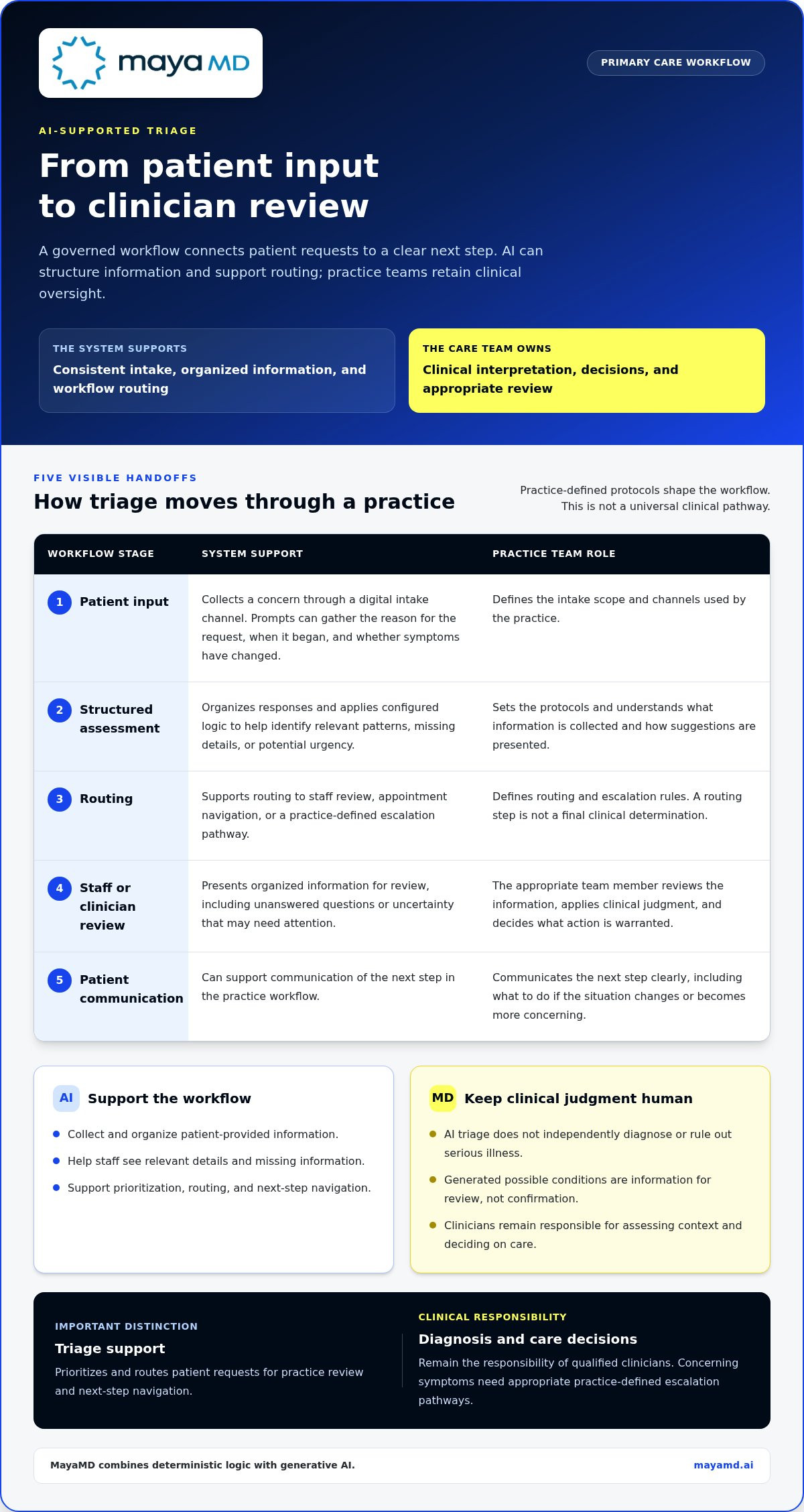
A well-governed triage workflow makes every handoff visible. It starts with what the patient reports and ends with a clear next step, with practice-defined protocols shaping what happens in between. This is not a universal clinical pathway: practices define the scope, review responsibilities, and escalation rules according to their own governance.
Patient input
The patient shares a concern through a digital intake channel. Prompts can gather relevant details consistently, such as the reason for the request, when it began, and whether symptoms have changed.
Structured assessment
The system organizes responses and applies the practice’s configured logic to help identify relevant patterns, missing details, or potential urgency.
Routing
Depending on the workflow, the request may be directed for staff review, appointment navigation, or an escalation pathway. Routing is a recommendation or process step, not a final clinical determination.
Clinician or staff review
The appropriate team member reviews the information, applies clinical judgment, and decides what action is warranted.
Patient communication
The practice communicates the next step in clear language, including what to do if the situation changes or becomes more concerning.
From symptom information to a structured triage summary
Consistency matters. A structured summary can bring together the patient’s description, relevant follow-up responses, and unanswered questions, so staff don’t have to reconstruct the request from scattered details. The output should make its limits clear: missing information and uncertain interpretation are reasons for review, not gaps to fill with confident-sounding assumptions.
Deterministic logic and generative AI can serve different roles. Configured logic can apply defined rules, while generative AI can help interpret or organize natural-language responses. MayaMD’s platform combines these approaches. The specific functions in a workflow depend on its configuration and governance. For practices considering digital intake and routing, MayaMD’s virtual triage approach provides relevant context.
Where human review and patient communication fit
Human review needs clear ownership. A practice should specify who reviews routine requests, who handles exceptions, and what happens when symptoms may be urgent or information is ambiguous. For organizations such as UK care providers managing intake across extended schedules, specialized operational support from Contesto can help maintain consistent out-of-hours coverage. If a response indicates potential urgency, the workflow should direct it to the appropriate practice-defined escalation pathway rather than let an automated summary stand in for assessment.
After review, clear communication helps patients understand whether to schedule, expect follow-up, provide more information, or use an urgent pathway. Staff should document the information and decision through the practice’s established process, preserving the source details and handoff context without assuming automatic transfer into an electronic health record. A connected triage design should make responsibilities easier to follow, not obscure who acted or what the patient was told.
Practices assessing AI patient triage software for primary care can use this sequence to clarify where automation supports the team and where human judgment remains essential. Learn more about MayaMD’s virtual triage capabilities.
How to compare AI patient triage software for primary care
Compare each solution against the same practice-specific scenarios, not just a feature list. Focus on clinical scope, human oversight, escalation, patient usability, and fit with existing access workflows. Pay particular attention to what happens when a patient’s information is incomplete or the system cannot confidently suggest a next step.
| Evaluation area | What to examine | Evidence to seek |
|---|---|---|
| Clinical scope | Which patient requests and use cases are within the system’s intended role? | Clear descriptions of intended use, limitations, and excluded scenarios. |
| Oversight and visibility | Can staff see the information and reasoning behind a suggested route? | Clinician review points, visible patient responses, and records of decisions or changes. |
| Escalation and uncertainty | How does the system handle concerning symptoms, missing answers, or ambiguous input? | Defined escalation behavior and a clear path to human review when the system is uncertain. |
| Usability | Can patients understand and complete the intake, and can staff interpret the resulting summary? | Demonstrations using realistic patient and staff workflows, including accessibility considerations. |
| Workflow fit | Does routing align with current staff responsibilities and patient access channels? | Documented workflow requirements and integration capabilities, without assuming interoperability. |
Clinical governance, transparency, and safety
Clinical teams need a clear account of how the system reaches or presents a recommendation, which protocols shape its behavior, and where its boundaries lie. Review how incomplete information is surfaced, whether outputs can be audited, and who is expected to act on an escalation. Safety or accuracy claims should be supported by evidence relevant to the intended population and use case, not broad assurances alone.
Separate evidence into three categories: vendor-reported performance, independently evaluated findings, and results observed in your own practice. These are not interchangeable. A vendor-reported result describes its stated context; independent evaluation may provide a different level of evidence; local measurement shows how the workflow performs with your patient population, staff, and protocols. Before relying on a metric, understand what was measured and under what conditions.
Workflow fit, patient experience, and connectivity
Test patient-facing interactions for plain language, ease of completion, and a clear explanation of what happens after submission. Consider how staff receive, interpret, and hand off the information, including who handles exceptions. A polished intake experience has limited value if the resulting work reaches the wrong team or creates duplicate documentation.
Review written documentation for any claimed connectivity or integration, including what information moves between systems and what remains a manual step. A demonstration or general statement about connectivity does not establish interoperability. Compare solutions using the same sample scenarios, including routine requests and edge cases. Emergency-triage metrics cannot establish primary-care effectiveness because the setting, workflow, intended use, and outcomes being assessed may differ. This disciplined comparison helps practices choose AI patient triage software for primary care based on governed workflow fit, not headline claims alone.
How to evaluate and introduce AI triage in a primary-care practice
Implementation should begin with the practice’s existing work, not a software configuration. Map where patient requests arrive, how information moves between staff, where queues build, and who reviews urgent or unclear concerns. This picture helps define a bounded use case for AI patient triage software for primary care and shows whether the workflow addresses a real operational need.
Document the current process before changing it. Trace a routine appointment request and a symptom-related request from initial contact through staff review and patient response. Note duplicate data entry, unclear handoffs, and points where requests wait for clinical judgment. These observations provide a baseline for evaluating a pilot without assuming automation will produce a particular result.
Set scope, ownership, and evaluation measures
Define intended use in writing: which requests the pilot covers, which situations it excludes, and what the system may contribute to intake or routing. Assign clinical ownership for reviewing protocols and exceptions, alongside an operational owner responsible for staff readiness and workflow coordination. Agree on how urgent concerns are escalated and who can authorize changes to approved workflows.
Choose measures that reflect both safety and day-to-day usability. Practices might track whether patients complete intake, whether requests reach the intended review pathway, how much staff effort triage requires, and how patients describe the clarity of next steps. Specify how each measure will be recorded and reviewed. Interpret baseline and pilot observations in context rather than treating them as proof of improvement on their own.
Plan implementation and continuous review
Start with a limited workflow and a defined review period instead of changing every intake route at once. Train participating staff on intended use, system boundaries, oversight responsibilities, and steps for handling incomplete or concerning submissions. Make clear how staff can pause or redirect the process if an output is unclear or a case falls outside the agreed scope.
During the pilot, review representative cases with the clinical and operational owners. Look for missing context, confusing summaries, unexpected routing, and points where patients or staff may misunderstand the next step. Include routine requests and exceptions, since edge cases can reveal weaknesses that a smooth demonstration may not show. Record findings, assign follow-up actions, and use the established governance process to approve protocol or workflow changes.
Keep the review cycle active after introduction. Revisit measures and case feedback at intervals set by the practice, and clarify who responds when concerns emerge. A governed rollout connects technology decisions to clinical accountability and the actual experience of patients and staff. Read more about MayaMD’s triage approach.
Where MayaMD fits in an AI triage strategy for primary care
MayaMD provides virtual triage and digital front-door solutions for practices organizing patient access through AI-supported workflows. These solutions connect digital intake with clinical support while keeping practice governance and clinician review central. The fit depends on the needs a practice has identified, the patient requests in scope, and how staff will use the information gathered through triage.
MayaMD’s cloud-based platform combines deterministic logic with generative AI. Its Clinical AI Agent supports patient engagement and clinical workflows, making it relevant to practices considering how triage might sit alongside other forms of patient support. The agent supports the care team; it does not replace clinician assessment or independently make final care decisions.
Connect triage with patient engagement and care continuity
Triage can be one part of a broader patient engagement approach. A practice may consider how an initial access request relates to later communication or ongoing support, while treating each workflow according to its purpose and clinical oversight. Connecting workflows does not mean every capability is the same service or automatically shares information across systems. Practices should define the handoffs and responsibilities that matter to their care model.
MayaMD also supports adjacent chronic-care workflows, including remote patient monitoring, Advanced Primary Care Management, and Principal Care Management. These capabilities may be relevant to a broader technology strategy, but they are distinct from the central question here: how to support patient triage and access in primary care. Keeping the scope clear helps decision-makers assess the triage workflow on its own merits.
Decide whether the approach fits your practice
Before selecting a solution, clarify the population and requests the workflow is intended to serve, the access problem it should address, and which clinicians or staff retain responsibility for review. Then assess whether the approach aligns with current intake channels, escalation processes, patient communication needs, and the measures the practice plans to evaluate. A focused scope makes implementation priorities easier to define and review.
Population and purpose
Identify which patient requests are in scope and which require another established process.
Clinical governance
Name owners for oversight, protocol review, and exceptions.
Workflow fit
Map where intake, staff review, routing, and patient communication connect.
Evaluation
Set baseline measures and review patient and staff experience alongside routing and workload observations.
A considered AI patient triage software for primary care strategy starts with practice goals, clear clinical ownership, and a defined process for learning from implementation. Explore how MayaMD’s virtual triage capabilities could align with your access workflow and governance priorities.
Make the next step deliberate
The strongest next step isn’t to automate more. It’s to identify one access workflow where structured support could help, then define how your team will oversee it and learn from its use. That disciplined starting point gives clinicians and staff a meaningful role in shaping how AI patient triage software for primary care fits the practice over time.
MayaMD brings virtual triage and digital front-door solutions into a broader clinical AI approach. Its cloud-based, HIPAA-compliant platform combines deterministic logic with generative AI to support patient access and clinical workflows while keeping care decisions with clinicians. The practical question is how those capabilities align with your patient population, governance model, and implementation priorities.
Start with a focused conversation about the workflow you want to support, the oversight it requires, and how your practice will evaluate the experience. Explore a governed triage approach with MayaMD and take a thoughtful first step toward more coordinated patient access.
Frequently Asked Questions
What is AI patient triage software for primary care?
It’s software that helps a practice gather and organize patient-reported information so staff can review requests and direct them through an appropriate access workflow. For example, a patient asking about a new concern may provide structured details that help the team decide which person or process should review the request. The tool supports prioritization; the practice defines its use and retains responsibility for clinical decisions.
Can AI triage software diagnose patients?
No. AI triage software should not be treated as making a confirmed diagnosis. Some tools may provide possible condition suggestions or clinical insights based on patient input, but those are not proof that a patient has a particular condition. A clinician must assess the person’s situation and determine any diagnosis or care plan. Practices should explain this distinction clearly in patient-facing language and staff guidance.
How does AI triage software route patient symptoms?
Routing depends on the software’s design and the practice’s configured protocols. A tool may collect details such as symptom onset, changes, and related concerns, then organize responses to support a route for staff review or another defined access step. If answers are incomplete or unclear, that uncertainty should remain visible so the practice can decide whether more information or human assessment is needed.
Is AI patient triage software safe for primary care?
Safety depends on how the system is scoped, configured, supervised, and monitored in the practice’s workflow. Before use, define which requests are included, who reviews outputs, and how urgent concerns or ambiguous cases reach appropriate human attention. Test representative scenarios, including incomplete answers, and review cases during implementation. A software tool should support clinical oversight, not replace it or be assumed safe based on broad claims alone.
Can AI triage software integrate with an EHR?
EHR connectivity varies by vendor, product, and practice environment. Don’t assume information will transfer automatically. Review documentation describing which data fields can move, whether the exchange is one-way or two-way, and what staff must enter manually. During planning, map how a triage summary would reach the record and how the team will avoid omissions or duplicate documentation.
What should a primary-care practice measure during an AI triage pilot?
Choose measures that reveal workflow performance and patient experience. A practice could track intake completion, whether requests reach the intended review pathway, staff time spent processing triage information, and patient understanding of next steps. Define how each measure will be collected before launch, then compare pilot observations with a baseline. Review exceptions alongside routine cases so aggregate results don’t conceal workflow concerns.
How is AI triage software different from emergency-department triage?
Primary-care AI triage generally supports access workflows, such as organizing incoming requests for practice review and helping guide next steps. Emergency-department triage is designed for a different setting and purpose, including assessing acuity among people seeking emergency care. The protocols, inputs, and performance measures may differ. A result reported for emergency care therefore doesn’t, by itself, show how a tool will perform in a primary-care practice.




See The MayaMD Difference
Fill the form below
Download Our Apps
MayaMD for patients and MayaPro for physicians - available on iOS and Android.
FOR PATIENTS
MayaMD App
AI-powered symptom assessment, triage, and secure access to your care team.


FOR PHYSICIANS
MayaPro App
MayaPro brings patient vitals, RPM/PCM care plans, and clinical decision support to your pocket.